
How to Plan Efficient Pool Service Routes


Route planning is the difference between servicing 15 pools a day and 22. It's the difference between 45 minutes of windshield time between stops and 8. And at the end of the week, it's the difference between $800 in gas and $400.
Yet most pool service companies plan routes the same way they did on day one: the order they picked up customers. The first account you signed goes first. The twentieth goes last. No thought to geography. No thought to traffic patterns. No thought to the fact that you're driving past 6 pools on the way to your 3rd stop.
This guide covers how to plan pool routes that actually make sense, whether you're solo with 60 pools or managing 5 techs with 400.
Key Takeaways
- Geography first, always. Group stops by neighborhood and plan outward from a starting point, not in the order you signed them
- 5–7 mile radius per day. The tightest routes keep all stops within this range
- Account for real drive time, not map distance. Traffic at 8 AM is different than at 2 PM
- Schedule around access, not just location. Gate codes, dog schedules, and homeowner preferences shape your route as much as geography does
- Rebuild routes quarterly. As you add and lose customers, routes drift from optimal. Reset them
Why Most Pool Routes Are Inefficient
The typical pool route grows organically. You sign your first customer in Scottsdale, your second in Tempe, your third back in Scottsdale but on the other side of town. You service them in that order because that's how your schedule filled up. Six months later you've got 80 pools spread across 3 cities with no logical grouping.
This is how pool pros end up driving 80–120 miles a day when 40–60 would cover the same stops. At current gas prices and truck maintenance costs, that's $3–5 per pool in unnecessary overhead. On a 300-pool route, that's $900–$1,500/month you're burning in the truck. PoolDial's route planner shows these costs on a map so you can spot the waste right away.
Step 1: Map Every Stop
Before you can optimize anything, you need to see everything. Plot every customer on a map. Every single one. If you've got 200 pools in a spreadsheet, put them all on a map and look at the distribution.
What you're looking for:
- Clusters: Neighborhoods where you have 8+ pools within a 2-mile radius. These are the core of efficient routes
- Outliers: Pools that are 10+ miles from any cluster. These are the ones killing your efficiency
- Gaps: Areas between clusters where you're driving through but have no stops. Future sales targets
- Overlap: Multiple techs servicing the same neighborhood on different days. Consolidation opportunity
Most pool service software has a map view for this. Google Maps works too. Drop pins for every customer and color-code them by service day. The visual alone will show you inefficiencies you can't see in a list. PoolDial color-codes stops by day so clusters and outliers stand out instantly.
Step 2: Group by Geography, Not by Day
The most common mistake is assigning customers to days based on when they signed up or when they requested service. Instead, assign them based on where they are.
Here's the approach that works for most pool companies:
- Divide your service area into zones. Draw rough boundaries: north, south, east, west. Or by neighborhood/city. Each zone should be roughly the same number of pools
- Assign one zone per day. Monday is the north zone. Tuesday is the east zone. Every pool in that zone gets serviced on that day
- Order stops within the zone. Start at one end and work your way across, minimizing backtracking. Think of it like mowing a lawn: parallel passes, not random zigzags
Zone-Based (Recommended)
Divide your service area into geographic zones. One zone per day. All stops in each zone are within a tight radius.
Loop-Based
Start at home/shop, make a loop through a cluster of stops, return. Multiple loops per day for different clusters.
Anchor-Based
Build routes around anchor accounts (large commercial pools, HOAs) and fill in residential stops nearby.
For most residential-heavy companies, zone-based routing is the clear winner. The only downside is that you may need to tell a new customer "we service your area on Wednesdays" instead of letting them pick whatever day they want. That's a worthwhile trade-off. The customers who insist on a specific day usually aren't worth the $5–8 per visit in extra drive time. PoolDial lets you drag and drop stops between days so you can build zones in minutes.
Step 3: Set a Realistic Stop Count
How many pools can you service in a day? The answer depends on pool type, service level, and drive time between stops.
| Pool Type | Avg. Service Time | Stops/Day (8 hrs) |
|---|---|---|
| Residential (chemical only) | 10–15 min | 22–28 |
| Residential (full service) | 20–30 min | 14–20 |
| HOA / multi-pool property | 45–90 min | 4–8 |
| Commercial (hotel, apartment) | 30–60 min | 6–10 |
These numbers assume 5–10 minutes of drive time between stops. If your route has 15–20 minutes between stops, knock 3–5 pools off the daily count. That's why route density matters so much. Every extra minute of driving is a pool you can't service.
A common mistake for growing companies: scheduling 20 full-service stops on a day where the tech also has a filter clean and an equipment check. Build in buffer. Most experienced route operators target 85% of theoretical capacity to account for traffic, problem pools, and the occasional locked gate. PoolDial's analytics dashboard tracks your actual service time per pool so you can set realistic daily targets.
Step 4: Sequence Stops to Minimize Backtracking
Once you've grouped stops by zone and set your daily count, the order within each day matters more than most people think.
Rules of thumb for stop sequencing:
- Start at the farthest point and work inward. Drive out to the farthest stop first thing in the morning when traffic is lighter, then work your way back toward home/shop. You'll be fighting rush hour less and finishing closer to home
- Hit time-sensitive stops early. Commercial pools with morning opening times, HOAs with early-morning quiet hours, residential pools where the homeowner asked to be done by noon
- Group by street or subdivision. If you have 4 pools on the same street, hit them consecutively even if it means a slightly longer drive to the next cluster. Parking once and walking to 4 backyards beats driving to 4 separate spots
- Account for left turns. Seriously. UPS famously saves millions by avoiding left turns. If two routes are equal distance, pick the one with more right turns. You'll save time at intersections
- End near a supply house. If you need to restock chemicals, end your route near your supplier so the trip doubles as your last drive of the day
PoolDial shows the total drive time for your day and updates it as you reorder stops.
Step 5: Factor in Access and Timing Constraints
Geography is only half the equation. Real routes have constraints that a map can't show you:
- Gate codes and key access. Some gated communities only allow service vehicles during certain hours
- Dog situations. If the dog needs to be put inside, the homeowner needs notice. Schedule these stops when someone is home
- Noise restrictions. Some HOAs prohibit equipment noise before 8 AM or after 5 PM. Don't schedule a pump prime at 7:15
- School zones. Routes that pass through school zones between 7:30–8:30 or 2:30–3:30 will lose 10–15 minutes. Route around them or schedule outside those windows
- Customer preferences. "Please come before my kids get home at 3" or "don't come during my work calls (10–12)." Document these and respect them
All of this information needs to live somewhere accessible to anyone who might run the route. If it's in the regular tech's head and they call in sick, the covering tech is flying blind. PoolDial stores gate codes, notes, and customer preferences on each stop so any tech can see them.
Step 6: Handle New Customers Without Breaking Your Route
The hardest part of route planning isn't the initial setup. It's maintaining efficiency as you add new customers.
When a new customer calls, the question isn't "what day works for you?" It's "where are you located?" Check which zone they fall in, and that determines their service day. If they're between two zones, assign them to whichever has more capacity.
If a new customer is 15 miles outside your closest zone, think hard before taking them on. A single outlier pool doesn't just cost you the drive time to that pool. It costs the drive time back to your next stop. That 15-mile outlier is really a 30-mile round trip, or roughly 45 minutes of dead drive time. Unless they're paying a premium that justifies that, it's better to pass or charge a trip fee. PoolDial shows the extra drive time a new stop adds before you commit to taking it on.
Step 7: Rebuild Routes Quarterly
Routes degrade over time. You add a customer here, lose one there. A new subdivision opens up. A tech quits and you redistribute their route among the remaining team. Six months of small changes turn an optimized route into a mess.
Set a calendar reminder to rebuild routes every quarter. Pull up the map view, look at the current distribution, and reorganize. You'll typically find:
- Stops that shifted zones because of ad-hoc scheduling
- New clusters that formed as you picked up customers in a neighborhood
- Outliers you accepted "temporarily" that are still on the route 4 months later
- Techs with unbalanced pool counts because adds and drops weren't evenly distributed
The quarterly rebuild doesn't need to be a full re-plan. It's more of a tune-up: shift 5–10 stops between days or techs to restore geographic tightness. Customers rarely notice a day change if you give them a week's notice. PoolDial's broadcast messaging lets you text all affected customers about their new day in one tap.
Multi-Tech Route Planning
Everything above applies to solo operators. When you have multiple techs, route planning adds another layer: balancing workload across the team while maintaining geographic efficiency.
The principles are the same (zone-based routing), but now each tech owns a zone or a set of zones. Key considerations:
- Equal pool counts don't mean equal workloads. A tech with 18 full-service residential pools has a harder day than a tech with 18 chemical-only pools. Balance by estimated hours, not by count
- Cross-train on adjacent zones. Each tech should know at least one other tech's territory for coverage when someone calls out
- Consider seniority and skill. Commercial and HOA accounts typically go to experienced techs. Don't give the new hire the 50-unit HOA with a board that counts skimmer leaves
- Monitor actual drive patterns. What looks efficient on a map may not play out in practice. Traffic, construction, and one-way streets change the reality
PoolDial's GPS tracking shows where each tech actually drives, so you can compare planned routes to real ones.
When to Use Route Optimization Software
Manual route planning works well up to about 100–150 pools. Beyond that, the number of variables (zones, stop counts, access constraints, tech assignments, day balancing) makes it hard to optimize by hand.
Route optimization software solves this by taking your full customer list, applying constraints, and generating optimized routes automatically. The software accounts for real drive times (including traffic patterns), stop durations, time windows, and tech capacity. These are things that are nearly impossible to balance manually at scale.
The ROI is straightforward. If optimization cuts 30 minutes of drive time per tech per day, and you have 4 techs, that's 2 hours of recovered service time daily, enough for 4–6 additional pools. At $150/month per pool, that's $600–$900/month in additional capacity. The math gets more compelling as you grow.
Even solo operators benefit. A route optimizer can resequence your daily stops in seconds, accounting for traffic patterns you'd never think to factor in. It won't restructure your zones for you, but it'll make each day within a zone tighter. PoolDial includes route optimization built into the planner at no extra cost.
Common Routing Mistakes to Avoid
- Letting customers dictate their service day. You control the schedule. Assign days by geography. The few customers who insist on a specific day aren't worth the routing cost
- Not tracking actual service time per pool. If you don't know that the Henderson pool takes 35 minutes (not the 20 you assumed), your daily plan is wrong by 3 PM
- Ignoring seasonal volume changes. Summer pools take longer (more chemicals, more debris, heaters running). Don't plan winter-pace routes for July
- Keeping outlier customers out of loyalty. That one pool 20 miles outside your zone costs more to service than it pays. Refer them to someone closer and reclaim the time
- Never re-optimizing. The route you planned 2 years ago with 40 pools is not optimal for your current 120 pools. Rebuild seasonally
PoolDial's chemical tracking also helps you spot pools that take longer than expected, so you can plan better.
A Practical Starting Framework
If you're starting from scratch or doing a full route rebuild, here's the process:
- Export all customers with addresses to a map
- Draw zone boundaries. Aim for 5–7 mile radius per zone
- Assign zones to days. One zone per day, or two half-day zones if you cover a wide area
- Order stops within each zone. Farthest first, work inward, group by street
- Mark constraints. Time-sensitive stops, access restrictions, problem pools
- Balance workload. Ensure each day has roughly equal service hours (not just pool count)
- Test drive the route. Run it for a week and note what doesn't work. Adjust
- Set a quarterly review. Rebuild or tune every 3 months
The first rebuild is the hardest because you're undoing months or years of organic growth. After that, quarterly tune-ups take 30 minutes and keep everything tight. PoolDial's map view makes the whole process drag-and-drop simple.
See It in Action: PoolDial Route Planner
PoolDial's route planner lets you drag-and-drop stops on a map, optimize driving order automatically, and see your whole week at a glance.
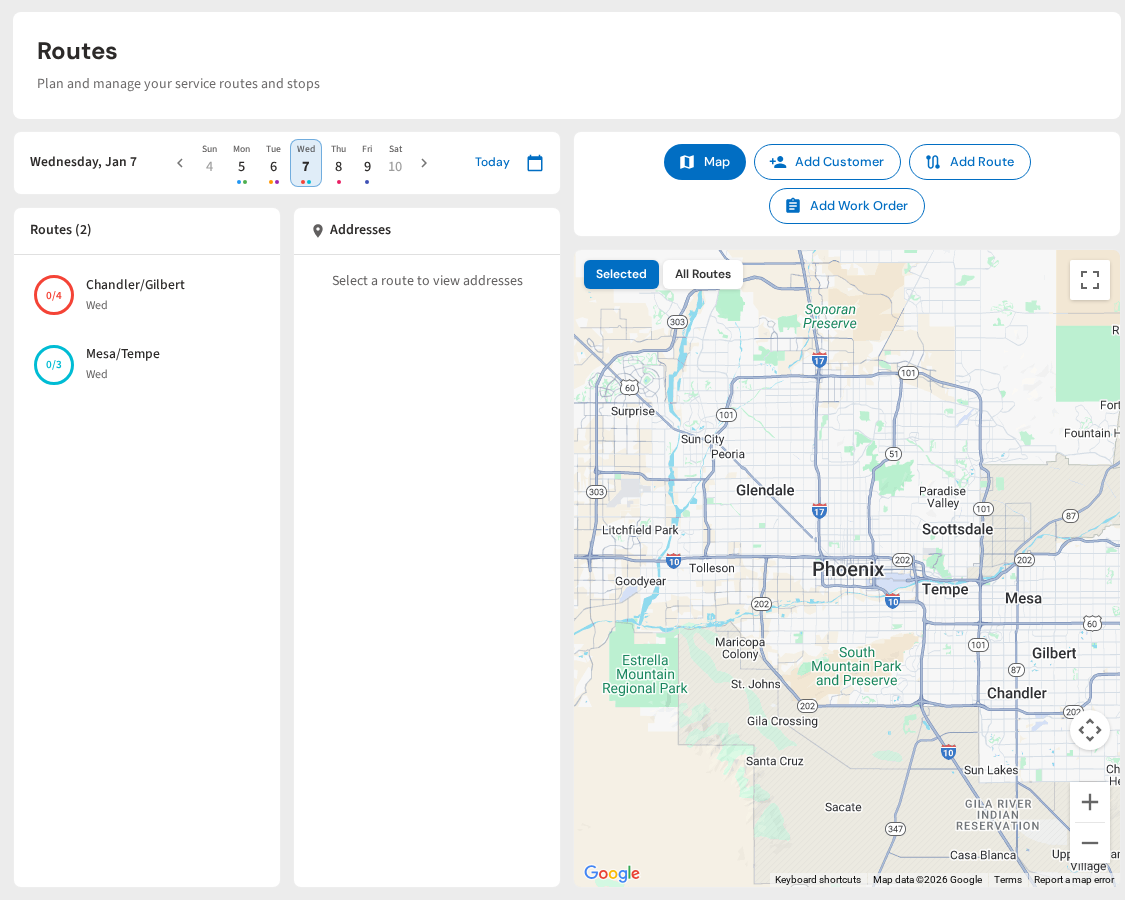
Dashboard route planner with map view and daily schedule
Plan routes on a map, not a spreadsheet
Drag-and-drop route planning, automatic drive time optimization, and turn-by-turn navigation for every tech. All at $2/pool.
Start Your Free Trial