
What Every Pool Service Website Needs to Get Leads


Most pool service companies either have no website at all, or they have one that looks like it was built in 2009 and never touched again. Both are costing you money every single day. When someone searches "pool service near me" on their phone and clicks your name, they decide in about five seconds if they are going to call you or hit the back button and call the next company. Your website is the thing that makes that decision for them.
This guide walks through every page your pool service website needs, what to put on each page, and how to make your site actually ring your phone. No fluff. No marketing jargon. Just the stuff that works.
Key Takeaways
- You need 5 core pages. Home, Services, About, Service Area, and Contact. Everything else is a bonus.
- Your phone number must be huge and clickable. Most visitors want to call, not fill out a form. Make it easy.
- Mobile-first is not optional. Over 70% of people searching for local services are on their phone. If your site does not work on a phone, it does not work.
- Use your own photos. Stock photos of crystal-clear pools look fake. Real photos of your work build trust fast.
- PoolDial builds all of this for you. The website builder creates a full site with every page in minutes. No coding needed.
Why Your Pool Business Needs a Website with PoolDial
You might think you do not need a website. You have been running your route for years. You get referrals. Your truck has a phone number on it. That is great, but here is what is happening behind the scenes.
When someone gets a referral for your company, the first thing they do is Google your name. If nothing comes up, or if they find a half-broken website with no photos and a dead phone number, they start to wonder if you are legit. Even warm referrals go cold when your online presence looks abandoned.
When someone searches "pool cleaning" plus their city or zip code, Google shows them a list of companies. The ones with websites, reviews, and complete Google Business Profiles show up at the top. The ones without websites show up nowhere. For a deeper look at how Google decides what to show, read our guide on setting up your Google Business Profile.
Your website does not need to be fancy. It does not need animations or videos or a blog. It needs to clearly answer three questions: What do you do? Where do you do it? How do I contact you? If your site answers those three things fast, it will get you leads.
Think of your website like your truck. It does not need to be a brand new $80,000 rig. But it needs to be clean, it needs to run, and it needs your name and number on it. The same is true for your website. Clean, working, with your name and number front and center.
The 5 Must-Have Pages for PoolDial Websites
You do not need 20 pages. You need 5 pages done well. Here is what each one should include and why it matters.
1. Home Page
This is your front door. Most visitors will land here first. You have about five seconds before they decide to stay or leave. Here is what needs to be above the fold (the part they see before scrolling):
- Your company name and what you do. "ABC Pool Service - Weekly Pool Cleaning in Phoenix, AZ." Simple. Clear. Done.
- Your phone number. Big. Bold. Clickable. Not buried in the footer. Right at the top.
- A call-to-action button. "Get a Free Quote" or "Call Now" in a bright color that stands out.
- One real photo of your work. A pool you actually cleaned. A before-and-after shot is even better.
Below the fold, include a short list of your services (3 to 5 bullet points), a couple of reviews, and your service area. Do not write a novel. People scan websites. They do not read them word by word. Short sentences, clear headings, and lots of white space.
2. Services Page
List every service you offer. Each one should have a short description (2 to 3 sentences) and ideally a photo. Here is an example layout:
- Weekly Pool Cleaning. We skim, vacuum, brush, and balance your chemicals every week. Your pool stays crystal clear without you lifting a finger.
- Green Pool Cleanup. Went on vacation and came back to a swamp? We will have it swim-ready in 24 to 48 hours.
- Equipment Repair. Pumps, filters, heaters, salt cells. We diagnose and fix the most common pool equipment problems.
- Filter Cleaning. Cartridge, DE, or sand. We clean or replace your filter media so your system runs at full power.
- Acid Wash and Drain. When a regular cleanup is not enough, we drain and acid wash your pool to bring the plaster back to life.
Notice how each description tells the customer what they get, not just what you do. "Your pool stays crystal clear" is better than "We perform chemical balancing." Speak their language, not yours.
3. About Page
People hire people, not companies. Your About page is where you become a real person instead of just another listing. Include:
- A photo of you (or your team). Wearing your company shirt, standing next to a pool. Not a selfie. A real photo that shows you are a professional.
- Your story in 3 to 5 sentences. How did you get into pool service? How long have you been doing it? Are you CPO certified? Keep it short and honest.
- What makes you different. Maybe it is that you show up on time every week. Maybe it is that you text photos after every visit. Whatever your thing is, say it here.
Do not write a fake corporate bio. Nobody wants to read "We at ABC Pool Service are committed to delivering world-class aquatic solutions." Just be yourself. "I'm Mike. I've been cleaning pools in Gilbert for 8 years. I have 85 customers and I know every one of them by name." That is the kind of thing that makes someone pick up the phone.
4. Service Area Page
This page is important for two reasons. First, it tells customers if you work in their area. Second, it helps Google show your site when someone searches for pool service in those specific cities. We will talk more about this in the local SEO section below.
List every city, town, and neighborhood you serve. If you work in the Phoenix metro area, do not just say "Phoenix." List out Mesa, Chandler, Gilbert, Scottsdale, Tempe, Glendale, Peoria, and every other city you drive to. Each one is a search term that someone might type into Google.
If you want to go a step further, create a short paragraph for each city: "We provide weekly pool cleaning in Gilbert, AZ. Gilbert is one of our busiest service areas, with over 40 residential pools on our weekly route." This gives Google more content to work with and helps you rank for those local searches. Our guide on building your online presence goes deeper into this strategy.
5. Contact Page
This is where the money is. Your contact page should have:
- Your phone number. Again, big and clickable. This is the most important thing on your entire website.
- A contact form. Name, phone, email, address, and a message box. Keep it simple. Do not ask for 15 fields of information.
- Your email address. Some people prefer email. Let them.
- Your hours. When can people reach you? If you do not answer the phone after 5 PM, say so.
Many pool pros make the mistake of having ONLY a contact form or ONLY a phone number. You need both. Some people want to call right now. Some people are searching at 10 PM and want to send a message. Give them both options.
That quote says it all. If someone calls your number and nobody answers, you probably lost that lead. That is why pairing your website with PoolDial's AI Receptionist is so powerful. It answers every call, 24 hours a day, 7 days a week. Even at 9 PM on a Saturday. Even when you are elbow-deep in a pump basket. The caller talks to a real-sounding assistant that can answer questions, take their info, and book a job. You never miss a lead.
Your Phone Number and PoolDial: Make It Big and Clickable
This deserves its own section because it is the single most common mistake on pool service websites. Your phone number should be:
- In the header of every page. Not just the contact page. Every page. When someone is ready to call, they should not have to go looking for your number.
- Large enough to read without squinting. If your phone number is the same size as your body text, it is too small. Make it stand out.
- A clickable link on mobile. When someone taps your phone number on their phone, it should start a call. This is done with a simple
tel:link. If your number is just plain text, people have to memorize it, switch apps, and dial it by hand. Most will not bother. - Your real number, not a tracking number you never check. Whatever number you put on your site, make sure it goes to a phone you actually answer.
Here is a real scenario. A homeowner in Scottsdale searches "pool service near me" at 7:30 AM on a Monday. She finds three companies. Company A has no phone number on the home page. She has to click "Contact" and scroll down to find it. Company B has a phone number, but it is tiny gray text in the footer and it is not clickable. Company C has a big blue phone number right at the top that she can tap with one thumb.
Company C gets the call. Every time. It sounds simple because it is simple. But go look at pool service websites in your area right now. You will be surprised how many of them hide their phone number or make it impossible to click on a phone.
Mobile-First Design and PoolDial Websites
Here is a number that should change how you think about your website: over 70% of local service searches happen on a phone. Not a laptop. Not a desktop computer. A phone. That means your website needs to look great and work perfectly on a 6-inch screen.
What does mobile-first mean in practice?
- Text is big enough to read. If people have to pinch and zoom, they will leave.
- Buttons are big enough to tap. A tiny "Call Now" link that is hard to hit with a thumb is useless.
- The page loads fast. If your site takes more than 3 seconds to load on a phone, half your visitors are gone before it finishes. This means your images need to be the right size, not 5 MB photos straight from your phone camera.
- No horizontal scrolling. Everything fits on the screen without needing to scroll left and right.
- The phone number is tappable. We already covered this, but it is worth repeating. On mobile, a tappable phone number is the single most important thing on your site.
Test your current website right now. Pull it up on your phone. Can you read everything? Can you tap the phone number to call? Does it load in under 3 seconds? Can you find your services and service area without hunting? If the answer to any of those is no, your site is losing you leads every day.
PoolDial's website builder creates sites that are mobile-first by default. You do not have to think about screen sizes or responsive design. Every site it builds looks great on a phone, a tablet, and a desktop. The phone number is always at the top, always clickable, and always big enough to see.
Real Photos vs. Stock Photos on PoolDial Sites
Stock photos are the fastest way to make your website look fake. You know the ones. A perfect turquoise pool with nobody around, shot from a drone, with palm trees that look like they belong in Bali. Your customers know those are not your pools. And if your photos are fake, they start to wonder what else is fake.
Here is what to use instead:
- Before-and-after photos. Nothing sells your service better than a green, nasty pool next to the same pool looking perfect three days later. Take a photo before you start and after you finish. Do this for green cleanups, filter cleans, and equipment installs.
- Photos of your truck and equipment. A clean, organized truck with your logo on it says "I'm a professional." It does not need to be brand new. It needs to be clean.
- Photos of you and your team. People want to know who is going to be in their backyard every week. A photo of you in your company shirt, smiling, standing next to a pool you just cleaned. That is worth more than any stock photo.
- Photos of your work in progress. Cleaning a filter, replacing a pump, testing the water. These action shots show people that you know what you are doing.
You do not need a professional photographer. Your phone camera is fine. Just make sure the photo is well-lit (natural daylight is best), not blurry, and taken in landscape mode (horizontal, not vertical). Take 3 to 5 photos every week. In a month you will have plenty of real content for your site.
That advice applies perfectly to your website photos. Be clear about what you do. Be concise in how you show it. And be consistent by adding new photos regularly. A website with photos from 2019 looks like a business that stopped caring in 2019.
Reviews and Testimonials on Your PoolDial Website
Reviews are the most powerful trust signal on the internet. When a stranger is deciding between you and three other pool companies, reviews are often the tiebreaker. Here is how to use them on your website:
- Show 3 to 5 of your best Google reviews on your home page. Include the customer's first name (ask permission first), their star rating, and 1 to 2 sentences from their review. Do not put all 50 reviews on your home page. Pick the best ones.
- Use reviews that mention specific things. "Mike is always on time and texts me a photo after every visit" is better than "Great service." Specific reviews are more believable and more helpful.
- Link to your Google Business Profile. Add a button that says "See all reviews on Google." This lets people verify that the reviews are real and also helps your Google ranking.
- Update them regularly. If your newest review is from 2023, people wonder if you are still in business. Add new reviews every few months.
If you do not have many reviews yet, start asking for them. After every green cleanup or equipment repair, send the customer a text with a direct link to leave a Google review. Most people will do it if you make it easy. PoolDial lets you send review request links by text right from the app.
Some pool pros worry about negative reviews showing on Google. Here is the truth: a business with 47 reviews and a 4.7-star rating looks more trustworthy than a business with 3 reviews and a perfect 5.0. People know nobody is perfect. A few negative reviews with professional responses actually make your profile look more real.
Service Area Pages for Local SEO with PoolDial
Local SEO is how you show up when someone searches "pool service in [your city]." Your website plays a big role in this. Google looks at the words on your site to figure out what you do and where you do it. If your site never mentions the cities you serve, Google has no reason to show you in those searches.
Here is the strategy that works:
- Create one main service area page. List every city and neighborhood you serve. This is the page we talked about in the 5 must-have pages section.
- If you serve 5+ cities, create a separate page for each major city. A dedicated page for "Pool Service in Chandler, AZ" will rank better for Chandler searches than a single page that lists 15 cities.
- Include real details on each city page. Do not just change the city name and copy the same text. Mention neighborhoods, landmarks, or common pool types in that area. "Many homes in Chandler's Ocotillo neighborhood have pebble-finish pools that need regular acid washing." This kind of detail tells Google (and customers) that you actually work in that area.
- Use the city name in your page title and first paragraph. "Pool Cleaning in Chandler, AZ" in the page title and "We provide weekly pool service to over 30 homes in Chandler" in the first sentence. Google pays attention to titles and early content.
Each city page should also have your phone number, a contact form, and a call-to-action. Someone who lands on your Chandler page should be able to call you or request a quote without clicking to another page.
PoolDial's website builder generates service area pages automatically based on the cities in your customer list. If you have customers in Mesa, Gilbert, and Queen Creek, it creates pages for all three. Each page includes your company info, services, and contact details. No copying and pasting. No writing the same content five different ways.
Contact Forms and Follow-Up with PoolDial
A contact form does something your phone number cannot: it collects leads when you are not available. At 10 PM on a Wednesday, someone searches for pool service, finds your site, and wants to reach out. They are not going to call at that hour. But they will fill out a form.
Here is what your contact form needs:
- Name. First and last.
- Phone number. This is more important than email. You are going to call them back, not send them a newsletter.
- Email. Good to have as a backup contact method.
- Address or zip code. So you know if they are in your service area before you call back.
- Message or service type. A dropdown with "Weekly cleaning, Green cleanup, Equipment repair, Other" is better than a blank text box. It gives you context before you call.
Keep the form short. Every extra field you add reduces the number of people who fill it out. Five fields is the sweet spot. If you need 10 fields of information, get the rest on the phone call.
The most important part of a contact form is what happens after someone submits it. You need to follow up fast. Studies show that calling a lead within 5 minutes makes you 10 times more likely to reach them compared to waiting 30 minutes. Set up a notification on your phone so you see form submissions the second they come in.
PoolDial's customer portal takes this a step further. When a new lead submits a form through your PoolDial website, it creates a lead record in your dashboard, sends you a push notification, and can even trigger an automatic text back to the customer: "Thanks for reaching out! We got your request and will call you shortly." That instant response keeps the lead warm while you finish your current stop.
If you cannot answer the phone at all during the day, pair your website with PoolDial's AI Receptionist. It picks up every call, talks to the customer naturally, answers common questions about your services and pricing, collects their information, and adds the lead to your dashboard. You review it when your day is done and call back with all the details already captured. No missed calls. No voicemails that sit for three days.
How PoolDial's Website Builder Creates All of This in Minutes
If reading all of this makes you think "I don't have time to build a website," that is exactly why PoolDial built the website builder. It takes everything in this guide and does it for you.
Here is how it works:
- Enter your company info. Name, phone number, services, service areas. The basics you already know.
- Upload your photos. Your logo, a few photos of your work, and a photo of yourself or your team.
- Pick a design. Choose from clean, professional templates built specifically for pool service companies. No generic business templates that look like they are for a law firm.
- Publish. Your site goes live with a custom domain, SSL certificate, mobile-first design, and all five essential pages.
The entire process takes less than 10 minutes. No coding. No hiring a web designer. No paying $2,000 for a site that takes six weeks to build and then looks nothing like what you wanted.
Every PoolDial website comes with:
- A clickable phone number on every page. In the header, in the footer, and in the body content.
- A contact form that sends you instant notifications. Never miss a lead.
- Mobile-first design that loads fast. Optimized images, clean code, and fast hosting.
- Service area pages for local SEO. Generated from your customer data so they are real, not generic.
- A reviews section. Pull in your Google reviews automatically so your site always shows your latest and best feedback.
- SSL encryption. The little lock icon in the browser that tells customers your site is secure. Google also ranks secure sites higher.
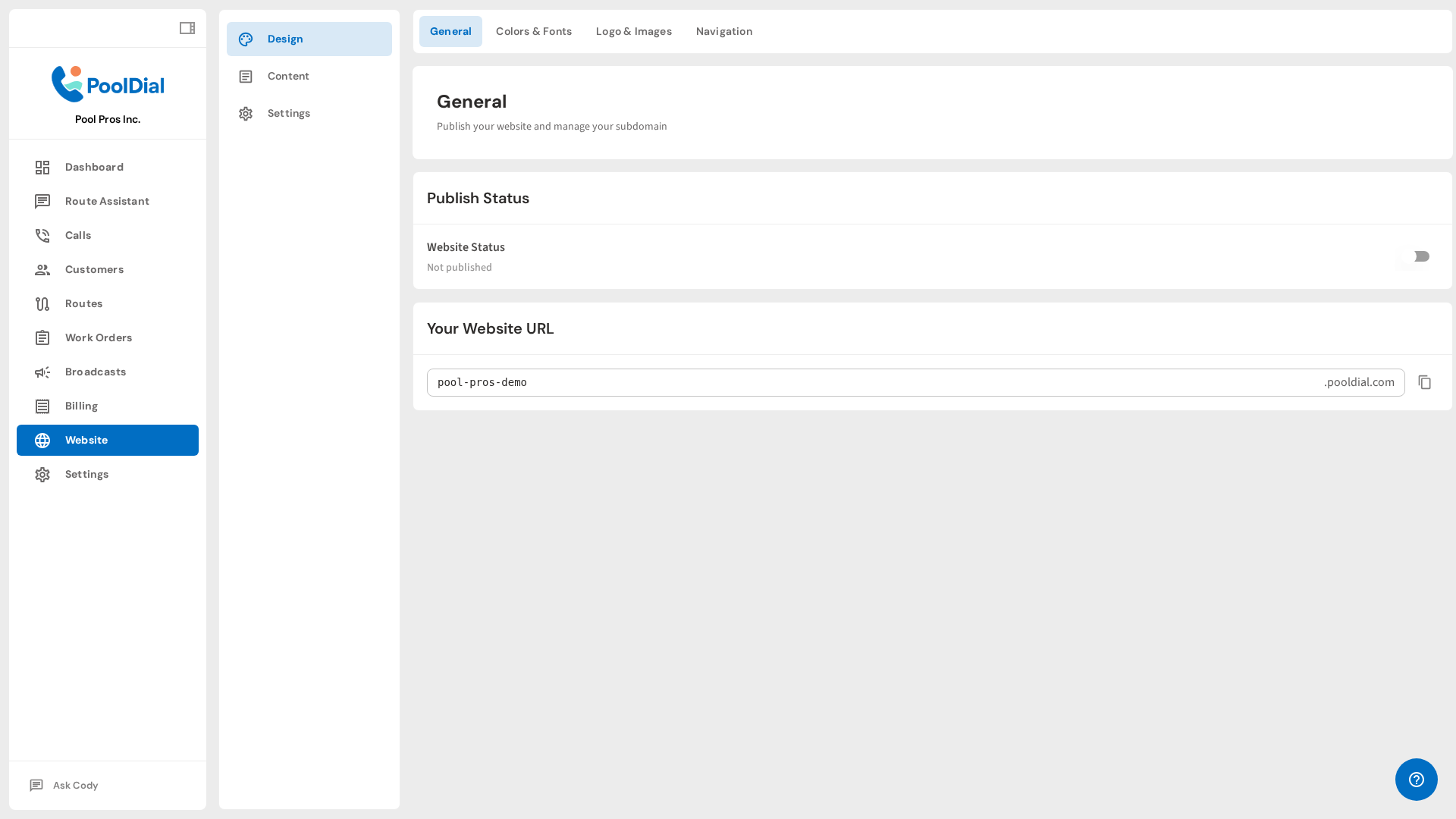
You do not need to be a web designer. You do not need to know HTML. You do not need to spend a weekend figuring out WordPress. Answer a few questions, upload a few photos, and you have a professional website that does everything in this guide. Then get back to cleaning pools.
Build Your Pool Service Website in Minutes
PoolDial's website builder creates a professional, mobile-first site with every page you need. Your phone number front and center, contact forms, service area pages, and reviews. No coding required. Plans start at $2/pool.
Start Your Free Trial