
Building an Online Presence for Your Pool Service Company


About 80% of homeowners search online before they call a pool service company. They type "pool cleaning near me" into Google, look at the first few results, check reviews, and pick someone. If your business does not show up in that search, you do not exist to those customers.
The good news is that you do not need to be a marketing expert. You do not need to spend thousands of dollars on ads. You need five things set up correctly, and most of them are free. This guide walks you through every piece of your online presence, step by step, with exactly what to do and what to skip.
Key Takeaways
- Start with a website and Google Business Profile. These two things together are enough to start getting found online.
- PoolDial builds your website for you. Enter your company name, service area, and phone number. Your site is live in minutes.
- Google Business Profile is free and critical. It controls what people see when they search your company name or "pool service near me."
- You do not need to be on every platform. Pick one or two social channels and do them well. Do not spread yourself thin.
- Reviews are the most powerful marketing tool you have. Five good Google reviews will do more for your business than a $500 ad campaign.
Why Your Online Presence Matters with PoolDial
Ten years ago, a pool service company could grow on referrals alone. A neighbor saw your truck, asked for a card, and called you. That still works, but it is not enough anymore. Here is what has changed:
- Homeowners search before they call. Even if a friend recommends you, the homeowner will still Google your company name. If nothing comes up, or if what comes up looks bad, they will call someone else.
- Your competitors are online. The pool company down the road has a website, a Google listing, and 40 reviews. If you do not, you are handing them customers.
- People expect to find you instantly. They do not want to call around. They want to tap a button on their phone and see your services, your reviews, and your phone number in five seconds.
- Online presence works while you sleep. Your website and Google listing bring in leads at midnight, on weekends, and while you are on a route. That is something a business card cannot do.
The pool service companies that grow the fastest in 2026 are not the ones with the best chemicals or the newest trucks. They are the ones that show up when someone searches "pool cleaning near me." And showing up is easier than you think.
The Minimum Viable Online Presence with PoolDial
You do not need everything at once. If you are starting from zero, here is the minimum you need to get found online:
- A website. Even a simple one-page site with your name, services, service area, and phone number. PoolDial's website builder creates this for you automatically.
- A Google Business Profile. This is the free listing that shows up in Google Maps and local search results. It takes about 20 minutes to set up.
That is it. Those two things together will get you showing up in local searches. Everything else in this guide, like Facebook, Instagram, Yelp, and Nextdoor, is extra. It helps, but it is not required to start.
Think of it this way: your website is your home base. Your Google Business Profile is your street sign. With those two in place, customers can find you. Everything else is just more signs pointing to the same front door.
Your Pool Service Website with PoolDial
Your website does not need to be fancy. It needs to answer three questions that every potential customer has:
- What do you do?
- Do you serve my area?
- How do I contact you?
That is it. If your website answers those three questions clearly, it is doing its job. Here is what your website needs:
- Your company name and logo. If you do not have a logo yet, just use your company name in a clean font. Do not let a missing logo stop you from launching a site.
- A list of your services. Weekly cleaning, one-time cleanups, equipment repair, green-to-clean, filter cleaning, and anything else you offer. Keep the descriptions short and simple.
- Your service area. List the cities, neighborhoods, or zip codes you cover. This helps Google connect you with local searches.
- Your phone number. Big and easy to find. On mobile, make it a tap-to-call link. Most of your visitors will be on their phones.
- A contact form or booking link. Some people prefer to fill out a form rather than call. PoolDial's customer portal gives customers a way to request service online.
- Photos of your work. Before-and-after shots of pools you have cleaned are gold. Even phone photos work. Real photos beat stock images every time.
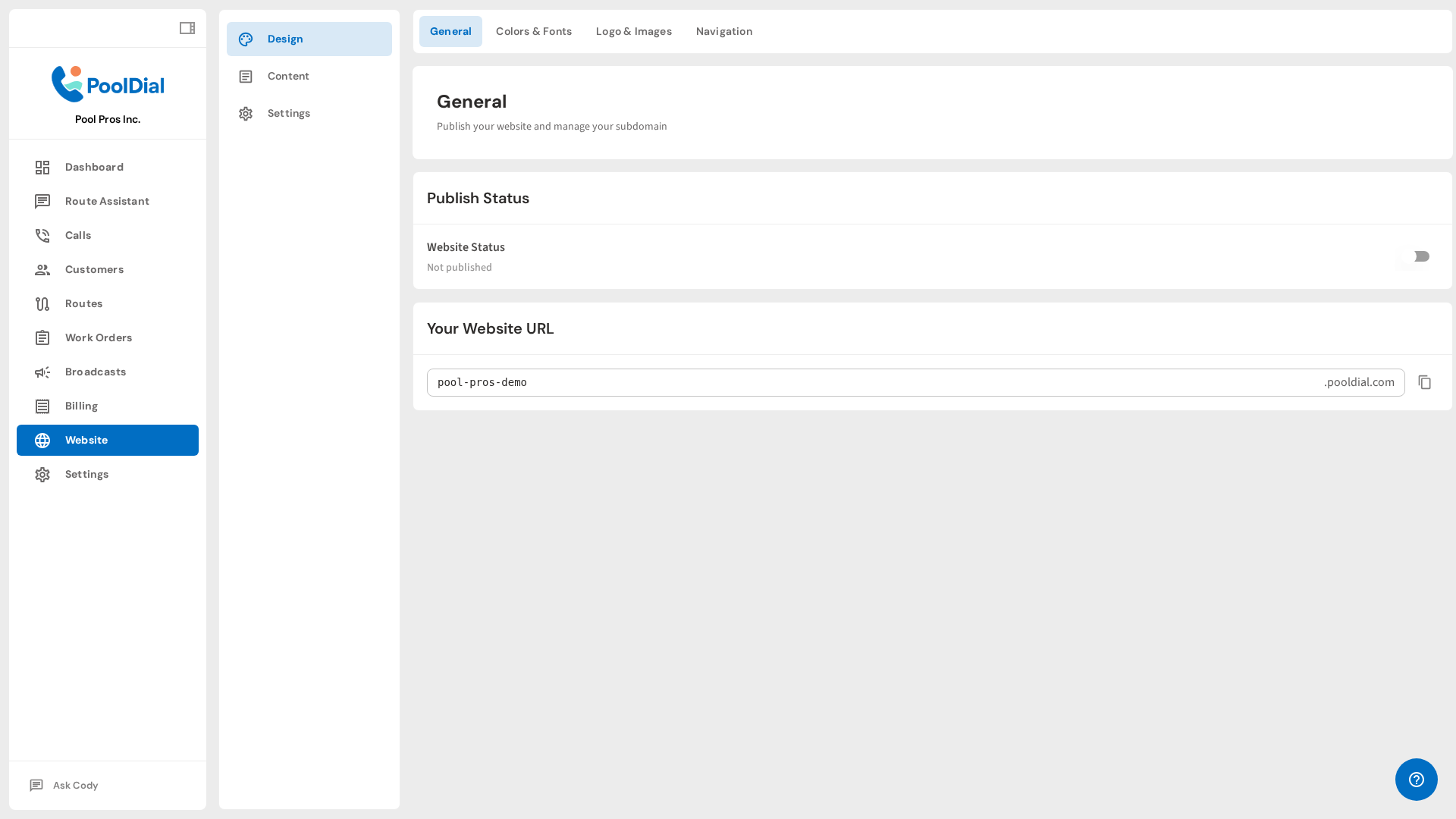
PoolDial's website builder handles all of this for you. You enter your company name, service area, and phone number. The system generates a professional website with all the sections listed above. It is mobile-friendly, loads fast, and is built to rank in local search results. You can also connect your own domain name so your site shows up at something like www.yourcompanyname.com.
For a deeper look at what makes a great pool service website, check out our guide on pool service website essentials.
Common website mistakes to avoid:
- No phone number on the home page. If people have to hunt for your number, they will leave.
- Stock photos of pools you did not clean. Customers can tell. Use real photos, even if they are not perfect.
- Too much text. Nobody reads a 500-word paragraph about your company history. Keep it short.
- No mobile version. More than 70% of your visitors are on phones. If your site does not work on mobile, you are losing most of your traffic. PoolDial sites are mobile-friendly by default.
- Never updating it. A website that says "Summer 2023 specials" in 2026 tells customers you do not care. PoolDial keeps your site current automatically.
Your Google Business Profile with PoolDial
If you only do one thing on this list besides building a website, do this. Your Google Business Profile (GBP) is the single most important piece of your online presence for local customers. It is free, and it directly controls what people see when they search for you.
When someone types "pool service near me" into Google, the first thing they see is a map with three businesses listed below it. That is the "local pack," and it is powered by Google Business Profiles. If you do not have one, you cannot show up there. Period.
How to set up your Google Business Profile:
- Go to business.google.com and sign in with a Google account.
- Click "Add your business" and enter your company name.
- Choose "Pool cleaning service" as your primary category. You can add secondary categories like "Swimming pool repair service" later.
- Enter your service area. Since you go to customers (not the other way around), choose "I deliver goods and services to my customers" and list the cities you cover.
- Add your phone number and website URL. If you use PoolDial's website builder, enter that URL here.
- Google will verify your business. This usually means they mail a postcard with a code to your address. It takes about a week. Some businesses can verify by phone or email.
- Once verified, add photos, your hours, and a short description of your services.
How to keep your Google Business Profile working for you:
- Post updates weekly. Google lets you create short posts on your profile. Share a before-and-after photo, a seasonal tip, or a promotion. This tells Google your business is active.
- Respond to every review. Good or bad, respond within 24 hours. Thank happy customers. Address complaints calmly and professionally. Google rewards businesses that engage with reviews.
- Keep your hours accurate. Update them for holidays and seasonal changes. Incorrect hours frustrate customers and hurt your ranking.
- Add photos regularly. Profiles with photos get 42% more requests for directions and 35% more clicks to websites, according to Google. Upload new photos at least once a month.
For a complete walkthrough, read our guide on setting up your Google Business Profile.
Common Google Business Profile mistakes:
- Not claiming your profile. Google may have already created a listing for your business. If you do not claim it, anyone can suggest edits, and incorrect information could show up.
- Wrong category. If you list yourself as "Pool builder" instead of "Pool cleaning service," you will attract the wrong customers.
- Ignoring bad reviews. A one-star review with no response looks terrible. A one-star review with a calm, professional response actually builds trust.
- Forgetting to verify. An unverified profile barely shows up in search. Complete the verification process as soon as possible.
Your Facebook Page with PoolDial
Facebook is not as trendy as it used to be, but it is still where a lot of homeowners spend time. A Facebook business page gives you three things: a place for customers to leave reviews, a way to post updates, and a channel for people to message you directly.
Setting up your Facebook page:
- Go to facebook.com/pages/create and choose "Business or Brand."
- Enter your company name and pick "Pool & Hot Tub Service" as your category.
- Add your profile photo (your logo or a clean photo of your truck) and a cover photo (a sparkling clean pool you serviced).
- Fill in your About section with your service area, phone number, website link, and a short description.
- Add your hours and enable messaging so customers can reach you directly.
What to post on Facebook and how often:
- Before-and-after photos. These get the most engagement by far. A green pool turned crystal clear is content that practically markets itself. Post one or two per week.
- Seasonal tips. "It is getting hot. Here is why your chlorine burns off faster in summer." Short, helpful posts that show you know what you are doing. Post once a week.
- Customer shoutouts. "Thanks to the Johnson family for trusting us with their pool for 3 years." People love seeing this, and it encourages referrals. Post once a month.
- Behind-the-scenes content. Your truck loaded up for the day. Your team at a training. A tricky repair you figured out. This makes you relatable. Post as it happens.
How often to post: Two to three times per week is plenty. Do not force it. One good post per week is better than five bad ones. And do not stress about likes. The real value of Facebook is that when someone Googles your company, your Facebook page shows up in the results and gives them more confidence in your business.
PoolDial's AI receptionist can handle incoming messages from customers who find you on Facebook and want to book service, even when you are on a route and cannot answer.
Common Facebook mistakes:
- Creating a personal profile instead of a business page. A business page gives you analytics, reviews, and ad options. A personal profile does not.
- Posting only sales pitches. Nobody follows a page that posts "Call us for pool service!" five times a week. Mix in helpful content and real photos.
- Ignoring messages. If someone messages your page and you do not respond for three days, you have lost that lead. Turn on notifications.
Your Instagram Account with PoolDial
Instagram is the best social media platform for pool service companies. Why? Because pools are visual. A sparkling blue pool against a green lawn is beautiful content. Before-and-after photos stop people mid-scroll. And you already take these photos on every job.
Setting up your Instagram:
- Download Instagram and create a business account (not a personal one). Business accounts give you analytics and the ability to add a contact button.
- Use your company name as your username. Keep it simple and searchable.
- Write a short bio: "Pool cleaning and repair in [your city]. Weekly service starting at $[price]. Book online [link]." Include your PoolDial website link.
- Add your profile photo (logo or branded truck).
What to post on Instagram:
- Before-and-after photos. This is your bread and butter. Take a photo of the pool before you start and after you finish. Post them side by side. These get shared more than anything else. Aim for two to three per week.
- Short videos. A 15-second clip of you vacuuming a pool, skimming debris, or backwashing a filter. Instagram Reels and Stories are built for this. Post one or two per week.
- Equipment tips. "This is what a clean filter cartridge looks like vs. a dirty one." Quick, educational content that builds trust. Post once a week.
- Satisfying cleaning shots. Slow-motion debris going into the skimmer basket. A pressure washer cleaning pool tile. These are oddly satisfying to watch and get great engagement. Post when you capture one.
Instagram tips for pool pros:
- Use location tags. Tag every post with your city. This helps local people find you.
- Use hashtags wisely. Stick to 5 to 10 relevant hashtags like #poolservice, #poolcleaning, #[yourcity]pools, #beforeandafter. Do not use 30 random hashtags.
- Post consistently. Three times per week is great. Once per week is fine. Zero posts for two months is a problem. Set a phone reminder if you need to.
- Respond to comments and DMs. Every comment is a chance to connect with a potential customer. A simple "Thanks!" or "That was a fun one to clean!" goes a long way.
Good marketing does not need to be expensive. Instagram is free. Your phone takes good enough photos. And every new customer you bring in through Instagram is pure profit because you spent nothing on advertising to get them.
Common Instagram mistakes:
- Only posting when you remember. Inconsistency kills your visibility. Batch your content. Take photos on Monday, post throughout the week.
- Using blurry or dark photos. Take photos in good lighting. Wipe your camera lens. Spend two extra seconds framing the shot. It makes a big difference.
- Ignoring Instagram Stories. Stories disappear after 24 hours, but they show up at the top of people's feeds. Use them for quick behind-the-scenes content and daily updates.
Online Reviews with PoolDial
Reviews are the most powerful marketing tool a pool service company can have. More powerful than ads, more powerful than a fancy website, more powerful than any social media post. Here is why: when a homeowner is choosing between two pool companies, they pick the one with more and better reviews almost every time.
Where to get reviews:
- Google (most important). Google reviews show up right in search results. They directly affect your local search ranking. This is where you want the most reviews.
- Yelp. Still important in many markets. Some homeowners check Yelp before making a decision. Do not ignore it, but focus on Google first.
- Nextdoor. This is a neighborhood-based social network. Homeowners regularly post asking "who do you use for pool service?" Having good reviews on Nextdoor means your name gets recommended.
- Facebook. Facebook reviews (called "Recommendations") show up on your business page. They are less important than Google but still help.
How to get more reviews:
- Ask every happy customer. After a service, send a text: "Thanks for choosing [company name]. If you have a minute, a Google review would mean a lot. Here is the link: [link]." Keep it short and make it easy.
- Time it right. Ask right after you complete a great service. Not two weeks later. The customer's satisfaction is highest the moment they see their sparkling pool.
- Make it one tap. Do not tell people to "find us on Google and leave a review." Give them a direct link. You can create a short link to your Google review page from your Google Business Profile dashboard.
- Use service reports. PoolDial's customer portal sends service reports after every visit. Include your Google review link in the report template.
- Do not offer incentives. Paying for reviews or offering discounts for reviews violates Google's terms and can get your reviews removed. Just ask honestly.
How to handle bad reviews:
- Respond quickly. Within 24 hours if possible. A bad review with no response looks worse than the review itself.
- Stay calm and professional. Never argue, never get defensive, and never make it personal. Other potential customers are reading your response.
- Acknowledge the problem. Even if you disagree, say something like "I am sorry you had that experience. That is not the level of service we aim for."
- Take it offline. Offer to discuss it by phone or email. "Please call us at [number] so we can make this right." This shows you care without airing the full argument in public.
- Learn from it. If two customers complain about the same thing, fix it. Bad reviews are painful, but they are also honest feedback.
How many reviews do you need? Five Google reviews is the minimum to look credible. Ten to twenty puts you ahead of most local pool companies. Fifty or more makes you dominant in your area. Aim to get one new review per week. At that pace, you will have 50 reviews within a year.
Common review mistakes:
- Never asking. Most happy customers will leave a review if you ask. Most will not do it on their own. You have to ask.
- Fake reviews. Do not write your own reviews or have friends write fake ones. Google is good at detecting these, and getting caught destroys your credibility.
- Only focusing on Google. Google is the priority, but do not ignore Yelp and Nextdoor. Some customers check those first.
- Ignoring bad reviews. Silence after a bad review tells everyone that you do not care. A professional response tells everyone that you do.
Putting It All Together with PoolDial
Here is your complete online presence checklist, in order of priority. Do not try to do everything in one day. Work through this list over a few weeks.
| Priority | Task | Time to Set Up | Update Frequency |
|---|---|---|---|
| 1 | Build your website with PoolDial | 10 minutes | Quarterly or as services change |
| 2 | Create Google Business Profile | 20 minutes + 1 week to verify | Weekly posts, monthly photos |
| 3 | Start asking for Google reviews | 5 minutes to set up a review link | After every great service |
| 4 | Create Facebook business page | 15 minutes | 2-3 posts per week |
| 5 | Create Instagram business account | 10 minutes | 2-3 posts per week |
| 6 | Claim Yelp and Nextdoor profiles | 15 minutes each | Respond to reviews as they come |
The most important thing is to start. A basic website and a Google Business Profile will put you ahead of pool companies that have been in business for 20 years but never got online. You do not need a perfect website. You do not need 100 Instagram followers. You need to show up when someone searches "pool service near me." That is the bar, and it is easier to clear than you think.
PoolDial makes the hardest part, building a website, the easiest part. You answer a few questions about your business, and PoolDial creates a professional site with your services, service area, contact information, and online booking. It handles mobile optimization, page speed, and basic SEO so you can focus on cleaning pools instead of learning web design.
Pair your PoolDial website with the AI receptionist and you have a business that answers calls, books jobs, and brings in new customers 24 hours a day, 7 days a week, even when you are knee-deep in a green pool.
Your PoolDial Online Presence Action Plan
Here is exactly what to do this week:
- Today: Sign up for PoolDial and build your website. It takes 10 minutes. You will have a live, professional site before lunch.
- Tomorrow: Create your Google Business Profile. Set aside 20 minutes. Have your address, phone number, and a few photos ready.
- This week: Ask your three happiest customers for a Google review. Send each one a text with your direct review link.
- Next week: Create a Facebook page and an Instagram account. Post your first before-and-after photo on each.
- This month: Claim your Yelp and Nextdoor profiles. Set a weekly reminder to post one update on Google, Facebook, or Instagram.
In 30 days, you will have a complete online presence. Your website will be live. Your Google listing will be verified. You will have a handful of reviews. And every time someone in your area searches for pool service, your name will come up.
That is how you grow a pool business in 2026. Not with expensive ads or marketing agencies. With a solid online presence that works for you around the clock.
Get Your Pool Service Website Live Today
PoolDial builds you a professional, mobile-friendly website in minutes. Add your company info, pick a design, and start getting found online. Plans start at $2/pool.
Start Your Free Trial