
Pool Service Website + Google Business Profile: A Complete Setup Guide


When a homeowner needs a pool service company, they do one thing first. They search Google. They type "pool service near me" or "pool cleaning [their city]." What shows up first? The Google Maps section. Three businesses with their name, star rating, phone number, and a link to their website. If you are not in that section, you are invisible to most of your future customers.
Getting there takes two things: a Google Business Profile and a website that works with it. Most pool pros have one or the other. Some have neither. This guide walks you through setting up both, step by step, so they work together to bring you more calls, more clicks, and more customers.
Key Takeaways
- You need both. Your Google Business Profile gets you found on Maps. Your website gives people a reason to call you instead of the next company.
- GBP is free. It costs nothing to create and takes about 30 minutes to set up correctly.
- Every field matters. Profiles with photos, hours, services, and a website link get 7x more clicks than empty ones.
- Your website is your home base. You own it. You control it. It works 24/7 to turn visitors into customers.
- PoolDial builds your website for you. The website builder creates a site that is already set up to work with Google Business Profile.
Why Your Pool Business Needs Both (And How PoolDial Connects Them)
Think of your Google Business Profile and your website as two parts of the same system. Your GBP is like a billboard on the highway. It catches attention. It tells people you exist. But a billboard alone does not close the sale. Your website is the storefront they walk into after they see the billboard.
Here is what each one does:
Google Business Profile:
- Shows up in Google Maps when someone searches for pool service in your area
- Displays your star rating, phone number, and hours
- Lets customers read reviews from other homeowners
- Shows photos of your work
- Links directly to your website
Your Website:
- Lists all your services in detail (weekly cleaning, repairs, green-to-clean, equipment installs)
- Shows your service area so customers know you cover their neighborhood
- Lets people request a quote or book online
- Builds trust with photos, testimonials, and your story
- Works for you while you sleep. Someone at 10 PM can still find you and fill out a contact form.
Without a GBP, people cannot find you on Google Maps. Without a website, people who find you have nowhere to go to learn more. You need both. The good news is that PoolDial's website builder creates a professional site in minutes that is already built to connect with your Google listing. And if you pair it with PoolDial's AI receptionist, every call from your GBP listing gets answered, even when you are out cleaning pools.
That quote tells you everything. When someone finds your listing on Google Maps and calls you, if nobody picks up, they are calling the next company. Your GBP gets them to call. Your website and phone system need to be ready when they do. For more on making sure your online presence is solid, check out our guide on building your pool service online presence.
How to Set Up Your Google Business Profile with PoolDial
Setting up your Google Business Profile is free and takes about 30 minutes. Here is exactly how to do it:
Step 1: Go to Google Business Profile
Open your browser and go to business.google.com. Sign in with your Google account. If you do not have one, create a free one first. Use an email address you check often because Google will send you important updates here.
Step 2: Search for your business
Type your business name in the search box. If your company already has a listing (someone may have created one automatically), it will show up. Click "Claim this business" and follow the steps. If your business does not appear, click "Add your business to Google" and start fresh.
Step 3: Enter your business name
Use your real business name. Do not stuff keywords in here. "Crystal Clear Pools" is correct. "Crystal Clear Pools - Best Pool Service in Phoenix AZ" is wrong and can get your listing suspended. Keep it simple. Keep it real.
Step 4: Choose your business category
Your primary category should be "Swimming Pool Service." This is the most important field for showing up in pool-related searches. You can add secondary categories too. Good ones include:
- Swimming Pool Repair Service
- Swimming Pool Contractor
- Swimming Pool Cleaning Service
Do not add categories that do not apply to you. If you do not build pools, do not add "Swimming Pool Contractor." Google uses these to match you with searches, and wrong categories hurt you more than help.
Step 5: Set your service area
Since you go to customers (not the other way around), choose "I deliver goods and services to my customers." Then enter the cities and zip codes you serve. Be honest. If you only serve a 20-mile radius, say so. You can always expand later. Google will show your listing to people searching in those areas.
Step 6: Add your contact info
Enter your phone number and your website URL. This is where your PoolDial website comes in. If you have already built your site with PoolDial's website builder, enter that URL here. Every click on your website link in Google Maps will go straight to a professional site that is built to convert visitors into customers.
Step 7: Verify your business
Google needs to confirm you are real. They usually do this by mailing a postcard with a code to your business address. It takes 5 to 14 days. Some businesses qualify for phone or email verification, which is faster. Enter the code when it arrives, and your listing goes live.
Filling Out Every Field on Your PoolDial-Connected GBP
Getting verified is just the beginning. An empty profile is almost as bad as no profile. Google gives you a lot of fields to fill out, and you should fill out every single one. Profiles that are 100% complete get 7 times more clicks than profiles that are half-done.
Here is what to fill out after verification:
Business description: You get 750 characters. Use them. Describe what you do, who you serve, and what makes you different. Keep it simple. Write it like you would say it on the phone. "We provide weekly pool cleaning, equipment repair, and green-to-clean services for homeowners in [your city]. Family-owned since [year]. Licensed and insured."
Hours of operation: Set your real hours. If you answer calls Monday through Friday 7 AM to 5 PM, put that. Also set holiday hours in advance so customers are not surprised. If your phone is answered by PoolDial's AI receptionist after hours, you can note that in your description.
Services: Google lets you add a list of services with optional descriptions and prices. Add every service you offer:
- Weekly pool cleaning
- One-time pool cleaning
- Green-to-clean
- Equipment repair
- Pump replacement
- Filter cleaning
- Salt cell replacement
- Pool inspections
- Acid wash
- Tile cleaning
You do not have to add prices if you prefer not to. But adding services with descriptions helps Google match you to more specific searches like "pool pump repair near me."
Attributes: Google offers checkboxes for things like "Veteran-owned," "Women-owned," "Online appointments," and more. Check every one that applies. These show up on your listing and help customers filter search results.
That advice applies perfectly here. Be clear about what you do. Be concise in your descriptions. And be consistent across your GBP, your website, and every other place your business shows up online.
Adding Photos That Win Customers on PoolDial and GBP
Photos are one of the biggest factors in whether someone clicks on your listing or scrolls past it. Google says businesses with photos get 42% more requests for directions and 35% more clicks to their website. Here is what to upload:
Must-have photos:
- Cover photo: A beautiful pool you service. Sparkling blue water, clean deck, bright day. This is the first photo people see.
- Logo: Your company logo. Keep it simple and readable at small sizes.
- Your truck or van: A wrapped vehicle shows you are a real, established company.
- You and your team: Real people build trust. A photo of you in a company shirt standing next to a clean pool goes a long way.
- Before and after: Green pool to clear pool. Dirty filter to clean filter. These tell a story better than any words can.
- Equipment work: Photos of pump installations, new salt cells, or filter replacements show that you do more than just skim and go.
Photo tips:
- Use your phone camera. You do not need a professional photographer.
- Take photos during the day with good natural light.
- Add 3 to 5 photos to start, then add new ones every month.
- Do not use stock photos. Customers can tell and it hurts trust.
- Make sure photos are at least 720 pixels wide for best quality.
Your PoolDial website also has a gallery section where you can show off your best work. Use the same photos in both places. When someone clicks from your GBP to your website, they should see more of the same quality work. It builds consistency and trust. For more on what your website needs, read our pool service website essentials guide.
Getting Your First Reviews on PoolDial and Google
Reviews are the single most important factor in local search ranking. A pool company with 50 five-star reviews will show up above a competitor with 5 reviews almost every time. More reviews also mean more trust. A homeowner will choose the company with 4.8 stars and 80 reviews over the company with 5.0 stars and 3 reviews.
Here is how to get reviews, starting from zero:
Step 1: Create your review link
In your Google Business Profile dashboard, go to "Ask for reviews." Google gives you a short link you can share. Copy this link. You will use it everywhere.
Step 2: Ask your best customers first
Think of 10 customers who love your work. Text them personally: "Hey [name], I'm building up my Google reviews. Would you mind leaving a quick one? Here's the link: [link]. It would mean a lot." Most will say yes because they like you and they know reviews help small businesses.
Step 3: Make it part of your routine
After every great service visit, send the review link. PoolDial can help you automate this. When you complete a service stop and mark it done in the app, you can follow up with a message that includes your review link. Make it easy. One tap. No friction.
Step 4: Respond to every review
When someone leaves a review (good or bad), respond. For positive reviews: "Thanks, [name]! We love taking care of your pool. See you next week." For negative reviews: "We're sorry about that, [name]. We've reached out to make it right." Responding shows future customers that you care. Google also favors businesses that engage with reviews.
How many reviews do you need?
| Review Count | What It Means |
|---|---|
| 1 to 10 | You exist. Better than nothing. Keep asking. |
| 10 to 25 | You look credible. Most homeowners will consider you. |
| 25 to 50 | You look established. You will start ranking higher in Maps. |
| 50+ | You dominate. Customers pick you over competitors with fewer reviews. |
Aim for 2 to 3 new reviews per month. In a year, you will have 25 to 35 reviews, which puts you ahead of most pool companies in any market.
Posting Weekly Updates on Your PoolDial-Linked GBP
Most pool companies set up their Google Business Profile and never touch it again. That is a mistake. Google rewards active profiles. Posting weekly updates tells Google your business is alive, and it gives potential customers more reasons to choose you.
Google Business Profile has a "Posts" feature that works like a mini social media feed. Each post shows up on your listing for 7 days. Here is what to post:
Weekly post ideas for pool companies:
- Before and after photos: "Another green-to-clean completed in [neighborhood]! This pool went from swamp to sparkling in 48 hours." Include a photo.
- Seasonal tips: "Spring is here. Time to check your pool filter. If it has been more than 6 months since your last clean, give us a call."
- Service spotlight: "Did you know we offer salt cell replacement? If your chlorinator is not producing, we can test and replace it in one visit."
- Special offers: "New customer special: First month of weekly service is 50% off. Book online at [your website link]."
- Team updates: "Welcome to our newest technician, [name]! He brings 5 years of pool experience to our team."
- Equipment tips: "Your pool pump should run 8 to 12 hours a day in summer. Running it less saves electricity but can turn your water green."
Each post takes about 5 minutes. Do it every Monday morning before your first stop. Set a phone reminder. The pool companies that post regularly stand out from the 90% that never do.
Posting format:
- Keep text under 300 words (shorter is better)
- Always include a photo
- Add a call-to-action button like "Learn more" or "Call now"
- Link the button to your PoolDial website or phone number
How GBP and Your Website Work Together for PoolDial Local SEO
Local SEO is how Google decides which pool companies to show when someone searches "pool service near me." It is not magic. Google looks at a few clear signals to decide who ranks where. Your GBP and your website send those signals together.
Here are the signals Google cares about most:
| Signal | Where It Comes From | What to Do |
|---|---|---|
| Relevance | GBP categories + website content | Use "pool service," "pool cleaning," and your city name on both your GBP and your website. |
| Distance | GBP service area | Set accurate service areas. List every city and zip code you cover. |
| Prominence | Reviews + website authority | Get more reviews. Keep your website updated. Get listed on other directories. |
| NAP consistency | GBP + website + directories | Your Name, Address, and Phone number must be exactly the same everywhere online. |
| Website quality | Your website | Fast loading speed. Mobile-friendly. SSL certificate (https). Real content. |
NAP consistency is critical. NAP stands for Name, Address, Phone. If your GBP says "Crystal Clear Pool Service" but your website says "Crystal Clear Pools LLC," Google gets confused. If your GBP phone number is (480) 555-1234 but your website says 480.555.1234, that is a mismatch. Make them identical everywhere: your GBP, your website, your Facebook page, Yelp, and any other directory you are listed on.
Your website should also include your service area on every page. PoolDial's website builder puts your service cities in the footer and on your services page automatically. This tells Google exactly where you work and helps you show up for searches in those cities.
The link between your GBP and website matters. When someone clicks from your Google listing to your website, Google tracks that click. If visitors stay on your site and look around, Google sees that as a good sign. If they bounce right back to the search results, Google sees that as a bad sign. A well-built website keeps people on the page and encourages them to call or fill out a form.
How PoolDial's Website Builder Works With Google Business Profile
Building a website from scratch is hard. You have to worry about hosting, design, mobile responsiveness, speed, SSL certificates, SEO tags, and a hundred other things. Most pool pros do not have time for that. That is why PoolDial built a website builder made specifically for pool service companies.
Here is what PoolDial's website builder gives you out of the box:
- Professional design: Clean, modern templates built for pool companies. No coding needed. Just add your logo, photos, and service details.
- Mobile-friendly: Over 60% of "near me" searches happen on phones. Your PoolDial site looks great on every screen size.
- Fast loading: Google penalizes slow sites. PoolDial sites are built for speed with optimized images and clean code.
- SSL included: Your site gets https automatically. Google gives a ranking boost to secure sites, and customers trust them more.
- SEO built in: Title tags, meta descriptions, header tags, and local keywords are set up for you. Your city name and service type are woven into the right places.
- Contact forms: Every page has a clear call to action. "Get a Free Quote" or "Schedule Service" buttons make it easy for visitors to reach you.
- Online booking: Customers can book service directly through your website, day or night.
- Service area pages: List every city you serve. This helps Google connect your site to local searches in those areas.
- Review display: Pull in your Google reviews and show them on your website. Social proof right where customers are making their decision.
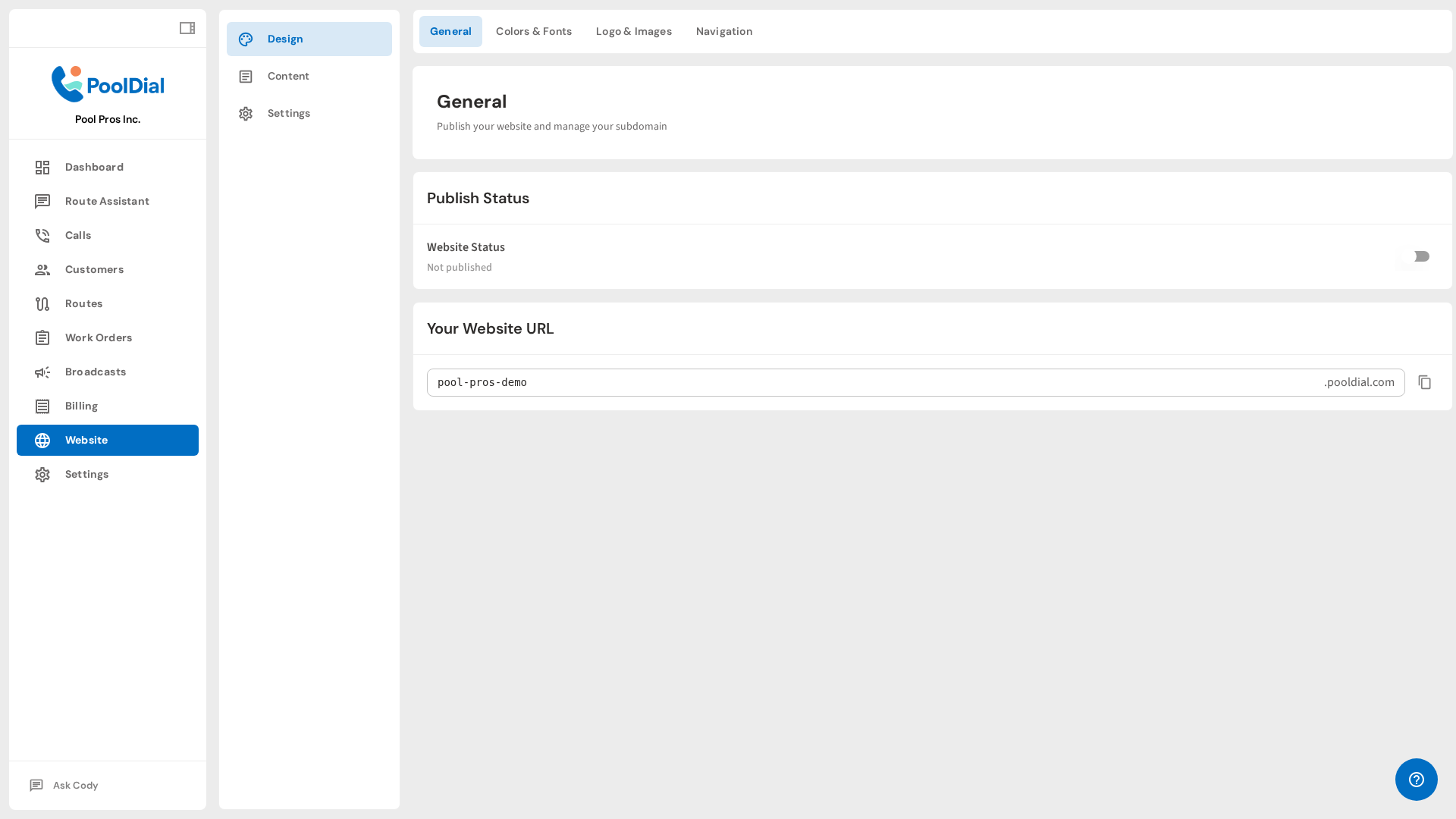
Once your site is live, copy the URL and paste it into your Google Business Profile. That link connects the two. Every time someone finds you on Google Maps and wants to learn more, they click through to a professional site that matches your listing. Same name. Same phone number. Same services. Same photos. Consistency builds trust, and trust turns searchers into customers.
If you already have a website you are happy with, that works too. The key is making sure your site and your GBP listing match. But if you are starting from zero or your current site is outdated, PoolDial's builder gets you a professional site in about 15 minutes.
Your First 30 Days: A PoolDial Google Business Profile Action Plan
Here is a simple plan to get everything set up in the next month. You do not have to do it all in one day. Spread it out over four weeks and you will have a complete online presence that brings in new customers on autopilot.
Week 1: Build the foundation
- Create or claim your Google Business Profile at business.google.com
- Fill out your business name, category (Swimming Pool Service), and service area
- Request verification (postcard, phone, or email)
- Build your website with PoolDial's website builder
- Add your website URL to your GBP listing
Week 2: Fill in the details
- Write your business description (750 characters max)
- Add all your services with descriptions
- Set your hours of operation (include holiday hours)
- Upload 5 to 10 photos (cover photo, logo, truck, team, before-and-after pools)
- Check all applicable attributes
Week 3: Start getting reviews
- Get your review link from your GBP dashboard
- Text it to your 10 best customers with a personal message
- Respond to every review that comes in
- Add the review link to your PoolDial website so customers can find it there too
Week 4: Build momentum
- Create your first GBP post (before-and-after photo or seasonal tip)
- Check your GBP Insights to see how many people viewed and clicked your listing
- Make sure your NAP (name, address, phone) is the same on your website, GBP, Facebook, and Yelp
- Set a weekly reminder to post on GBP every Monday
- Set up PoolDial's AI receptionist so every call from your listing gets answered
After 30 days, you will have a verified Google Business Profile connected to a professional website. You will have 5 to 10 reviews and your first few GBP posts live. That puts you ahead of the majority of pool companies in your market, most of which have either an incomplete profile, no website, or both.
From there, it is all about consistency. Post weekly. Ask for reviews after great service visits. Keep your photos fresh. Update your services when you add new ones. The pool companies that treat their online presence like part of their business, not an afterthought, are the ones that keep growing.
Build Your Pool Service Website in Minutes
PoolDial's website builder creates a professional site that works with your Google Business Profile right out of the box. Mobile-friendly, SEO-ready, and built for pool pros. Plans start at $2/pool.
Start Your Free Trial