
Revenue Tracking for Pool Service Companies: Beyond the Spreadsheet


You started with a spreadsheet. Everyone does. You had 15 pools, a column for each customer, and a row for each month. It worked great. You could see who paid, who owed you, and how much you made. Simple.
Then you hit 40 pools. Then 60. Then 80. And that spreadsheet started to crack. You forgot to update a row. You mixed up a payment with a one-time repair charge. You looked at last month's total and thought you were doing great, but $1,200 was still sitting unpaid. The number you saw and the number in your bank account were not the same.
This is the story of almost every pool service owner who grows past a certain size. The tool that got you started becomes the tool that holds you back. This guide will show you what real revenue tracking looks like, why it matters for your growth, and how to set it up without spending hours on data entry.
Key Takeaways
- Spreadsheets work for small operations. But they break down around 50 to 80 pools because manual entry creates errors and delays.
- Revenue tracking is more than total income. You need to see MRR, one-time revenue, past-due amounts, and revenue by service type.
- Real-time numbers change everything. Knowing today's revenue lets you make decisions today, not after you catch up on bookkeeping.
- Seasonal trends help you plan. When you can see year-over-year patterns, you stop being surprised by slow months.
- PoolDial automates all of this. Every invoice, payment, and past-due balance flows into your analytics dashboard automatically.
The Spreadsheet Trap (and Why PoolDial Exists)
Let's be honest about what happens with spreadsheets. At 20 pools, you update your sheet every Sunday night. It takes 10 minutes. You know every customer by name. You know who paid and who didn't because you can keep it all in your head.
At 40 pools, Sunday night takes 30 minutes. You start skipping weeks. When you do sit down, you have to dig through your bank statements to match deposits to customers. Some customers pay by check, some by Venmo, some by Zelle. You have to remember which payment method each person uses and match it all up by hand.
At 60 pools, you are behind. You haven't updated the sheet in three weeks. You are pretty sure Mrs. Johnson paid, but you aren't 100% sure. You think you made about $11,000 last month, but you won't know the real number until you spend two hours catching up. And those two hours feel like torture after a full week in the field.
At 80 pools, the spreadsheet is a fiction. The numbers in it are best guesses. You stopped trusting it months ago. You make decisions based on your bank balance, which tells you how much cash you have right now but tells you nothing about revenue trends, who owes you money, or whether you are actually growing.
This is the spreadsheet trap. It feels free, but the cost is invisible. The cost is bad decisions made with bad data. The cost is money left on the table because you didn't notice a customer stopped paying. The cost is hiring too late or too early because you couldn't see the trend.
Cash flow starts with knowing your numbers. And you can't know your numbers if your tracking system depends on you remembering to update it every week.
What Revenue Tracking Should Include with PoolDial
Most pool pros think revenue tracking means one thing: how much money came in this month. That's a start, but it's not enough. Here's what a complete revenue picture looks like:
Monthly Recurring Revenue (MRR). This is the bread and butter of your pool service business. It's the total amount you would collect this month if every recurring customer paid on time. If you have 70 customers at an average of $160 per month, your MRR is $11,200. This number tells you your baseline. It's the floor. Everything else is built on top of it.
One-time revenue. This is money from repairs, equipment installs, green pool cleanups, filter cleans, and any other job that isn't part of your regular monthly service. One-time revenue is harder to predict, but it's often 15 to 30 percent of total revenue for a healthy pool company. If you aren't tracking it separately, you can't see how much of your income depends on it.
Past-due amounts. This is money you have earned but haven't collected yet. Your MRR might be $11,200, but if $1,800 is past due, your actual cash coming in is only $9,400. Past-due amounts are the gap between what you think you are making and what you are actually making. PoolDial's billing system tracks this in real time so you always know the gap.
Revenue by service type. How much comes from weekly maintenance? How much from repairs? How much from one-time cleanups? When you can see this breakdown, you can make smarter decisions about where to focus your time and marketing.
Revenue per customer. Your average matters, but the range matters more. If most of your customers pay $150 but you have five paying $300 for premium service, you want to know that. You also want to know if you have customers paying $100 who should be paying $140 because you haven't raised their price in two years. PoolDial's customer profiles show you each customer's lifetime value and current rate so you can spot these gaps.
| Metric | What It Tells You | Spreadsheet? | PoolDial? |
|---|---|---|---|
| MRR | Your recurring income baseline | Manual calculation | Automatic, real-time |
| One-time revenue | Income from repairs and extra jobs | Easily mixed with MRR | Tracked separately |
| Past-due total | Money earned but not collected | Unknown until you check | Updated every day |
| Revenue by service type | Where your money comes from | Very hard to track | Built-in breakdown |
| Revenue per customer | Who your best customers are | Possible but tedious | On every customer profile |
A spreadsheet can technically hold all of this data. But the question is whether you will actually keep it updated. For most pool pros, the answer is no. Not because they're lazy, but because they are spending 8 to 10 hours a day in the heat cleaning pools. The last thing anyone wants to do after that is data entry.
Why Real-Time Revenue Matters with PoolDial
Here's a scenario. It's the 15th of the month. You have been busy. Lots of pools, a few repairs, a green pool cleanup. You feel like it's been a good month. But is it? With a spreadsheet, you have no idea. You won't know until you sit down at the end of the month and add everything up.
With real-time tracking, you open your phone and see: $7,800 collected so far this month. $2,400 still outstanding. $600 past due from last month. You know exactly where you stand. You know if you need to send reminders. You know if you are on track to beat last month or if you are falling behind.
This matters because business decisions happen in the moment, not at the end of the month. Here are some decisions that need real-time data:
- Should I take on that repair job this week? If you are already at $8,000 for the month and your target is $10,000, you know you have room. If you are at $5,000 and behind, maybe you prioritize the higher-paying job first.
- Can I afford that new piece of equipment? Not "do I have money in the bank" but "is my revenue trend supporting this purchase?" Real-time data answers this.
- Is that new marketing working? If you started a Google ad campaign two months ago and your revenue is up 12%, you can see that. If it's flat, you can stop wasting money.
- Who needs a reminder? Instead of waiting until the end of the month to figure out who hasn't paid, you can see it today and send a text right now.
The pool pros who grow the fastest are the ones who make decisions with current information, not month-old data. PoolDial gives you a live dashboard that updates every time a payment comes in, an invoice goes out, or a customer's status changes. There is nothing to update by hand. You read it like a speedometer. For more on which numbers to watch, see our guide on pool service business metrics.
Tracking Revenue Trends with PoolDial
Knowing your revenue for this month is good. Knowing how it compares to last month is better. Knowing how it compares to the same month last year is best.
Revenue trends tell you three things:
1. Are you growing? If your MRR was $9,000 in January and it's $11,200 in April, you grew 24% in three months. That's a strong signal that what you are doing is working. But if your MRR has been flat at $9,000 for six months, something needs to change. Maybe your pricing is too low. Maybe you are losing as many customers as you are gaining. You can't diagnose the problem until you can see the pattern.
2. What is seasonal and what is real? Pool service revenue follows a seasonal curve in most markets. In Phoenix, it dips in December and January when some customers pause service. In the Midwest, it drops to almost nothing in winter. If your revenue drops 15% in November, is that a problem or is it normal? You only know the answer if you can compare it to last November. PoolDial stores your revenue history so you can see year-over-year comparisons and stop panicking about normal seasonal changes.
3. Are you keeping customers? Revenue growth masks churn. If you add 10 new customers but lose 8, your MRR barely moves. But you are working much harder to stay in the same place. When you track monthly revenue trends, a flat line with high customer turnover looks very different from a flat line with stable customers. PoolDial shows both your gross and net customer changes so you can see the full picture.
Here's what a healthy revenue trend looks like for a growing pool company:
| Month | MRR | One-Time | Total | Change |
|---|---|---|---|---|
| January | $8,400 | $1,200 | $9,600 | -- |
| February | $8,800 | $900 | $9,700 | +1% |
| March | $9,600 | $2,100 | $11,700 | +21% |
| April | $10,400 | $2,800 | $13,200 | +13% |
Notice how MRR climbs steadily while one-time revenue is spiky. That's normal. The MRR growth tells you the business is healthy. The one-time spikes in March and April are seasonal. Pool season is starting, and customers need green pool cleanups, equipment startups, and repairs after winter. If you only looked at total revenue, you might think April was great and forget that a big chunk of it won't repeat next month.
Separating Recurring Revenue from One-Time Revenue with PoolDial
This is one of the most important things you can do, and it's one of the hardest things to do in a spreadsheet. You need to know which dollars will show up again next month and which dollars were a one-time thing.
Why does this matter? Because you make different decisions based on each type.
Recurring revenue decisions: Should I hire another tech? Can I afford a truck payment? Should I raise my prices? These decisions all depend on money that you can count on month after month. If your MRR is $12,000 and your expenses are $9,000, you know you have $3,000 in monthly profit from recurring work alone. That's the foundation.
One-time revenue decisions: Should I buy a new pump for stock? Should I invest in repair training? Should I market my repair services more? One-time revenue tells you how much extra you can earn beyond your base. If you are doing $2,000 to $3,000 per month in repairs and cleanups on top of your recurring work, that's meaningful money. But it fluctuates, so you don't want to base fixed expenses on it.
In a spreadsheet, recurring and one-time revenue usually end up in the same column. Maybe you color-code them. Maybe you put them on separate tabs. But over time, the distinction gets blurry. A filter clean that started as one-time becomes quarterly. A repair leads to a monthly maintenance contract. You stop being sure which is which.
PoolDial separates these automatically. Every recurring service generates recurring invoices. Every work order generates a one-time invoice. They flow into different buckets on your dashboard. You never have to sort them by hand. You can also read our guide on invoice best practices to make sure every charge is categorized correctly from the start.
Using Revenue Data to Plan Hiring and Purchases with PoolDial
Revenue data is not just a scorecard. It's a planning tool. Here's how smart pool service owners use it to make their next move.
When to hire. The general rule is that a solo pool tech can handle 60 to 80 pools depending on route density, drive times, and service complexity. If your MRR is growing and you are approaching that limit, you need to hire before you hit it. Not after. If you wait until you are drowning, you'll rush the hire and make a bad choice.
Here's the math. Let's say you are at 70 pools with an MRR of $11,200. You are getting 3 to 4 new customer inquiries per week. Your revenue trend shows 8% month-over-month growth. At that rate, you will hit 85 pools in about 6 weeks. It takes 2 to 4 weeks to find, hire, and train a new tech. So you need to start hiring now, not when you hit 85.
Without revenue trend data, you would not see this coming. You'd just feel busier and busier until you start dropping balls. Then you'd panic-hire. PoolDial shows your growth rate so you can see the hiring need coming months in advance.
When to buy equipment. Big purchases like a new truck, a trailer, or a chemical stock-up should be timed to your revenue cycle. If you know from last year's data that March through May is your biggest growth period, you can buy the truck in February when you have the cash from a good fall and the growth is about to start. Don't buy the truck in July after you've already spent the spring growth catching up on expenses.
When to raise prices. Revenue per customer is the key metric here. If your average customer pays $150 and your costs have gone up 10% since you set that price, you are losing ground. PoolDial shows you every customer's rate, how long they have been at that rate, and what your average is. When your average drops below your target, it's time for a price increase. Check our metrics guide for benchmarks on what pool pros charge in different markets.
When to market. Revenue trends also tell you when your marketing is working and when it isn't. If you ran a Facebook ad campaign in March and your new customer signups doubled in April, the campaign worked. If signups stayed flat, it didn't. Without tracking the trend, you'd just be guessing. Many pool pros spend money on marketing and never know if it paid off because they can't connect the spending to the revenue change.
Understanding Seasonal Patterns with PoolDial
Pool service revenue is not the same every month. If you are in a year-round market like Florida, Arizona, or Southern California, the swings are smaller, but they still exist. If you are in a seasonal market like the Midwest, Northeast, or Pacific Northwest, the swings can be dramatic.
Here's why understanding your seasonal pattern matters:
Budgeting. If you know that December revenue is typically 20% lower than June revenue, you can plan for it. You can set aside extra cash in your peak months to cover the dip. You won't panic in December because you expected the drop.
Staffing. Some pool companies hire seasonal techs for the summer rush. If you know from your data that May through September accounts for 60% of your annual revenue, you can plan to bring on help for those five months and build the labor cost into your budget.
Marketing timing. The best time to market is right before your growth season, not during it. If your biggest growth month is March (pools coming out of winter), start your marketing in January. If you wait until March, you are already behind. Your revenue data from previous years tells you exactly when to start.
Setting customer expectations. If you know from your data that June is your busiest month and service visits might run a few hours behind schedule, you can communicate that to customers in advance. Proactive communication prevents complaints.
PoolDial stores every month of your revenue data from the day you start using it. After one full year, you have a complete seasonal baseline. After two years, you can see which changes are trends and which are seasonal noise. This is something a spreadsheet could technically do, but in practice almost nobody maintains a spreadsheet with that level of detail for more than a few months.
Common Revenue Tracking Mistakes (and How PoolDial Prevents Them)
Even if you are trying to track revenue carefully, there are mistakes that trip up most pool service owners. Here are the big ones:
Confusing invoiced revenue with collected revenue. You sent out $11,000 in invoices. Great. But if only $9,200 has been collected, your real revenue is $9,200. The gap is your accounts receivable. Many pool pros look at the invoice total and think that's what they made. It's not. It's what they are owed. PoolDial shows both numbers and makes the gap obvious so you can follow up on unpaid invoices fast.
Not tracking cancellations. When a customer cancels, your MRR drops. But if you don't update your spreadsheet right away (and let's be real, you probably won't), you're looking at an inflated MRR for weeks. PoolDial updates MRR in real time when a customer is marked as inactive.
Forgetting about credits and refunds. If you gave a customer a $50 credit for a missed visit, that reduces your revenue. If you refunded a charge, that's negative revenue. These are easy to forget in a spreadsheet. PoolDial records every credit and refund and subtracts them from your totals automatically.
Ignoring payment method mix. It matters how your customers pay. Credit card payments hit your account in 1 to 2 days. Checks can take a week or more. If 30% of your customers pay by check, your cash flow is slower than your revenue numbers suggest. PoolDial shows you payment method breakdown so you can see how much revenue is in "check limbo" at any time. If you want to fix this, our guide on setting up autopay walks you through moving customers to automatic card payments.
Only looking backward. Most spreadsheet users only track what already happened. They don't project forward. If your MRR has been growing at 5% per month, what will your revenue be in six months? Where do you need it to be to cover that new truck? Forward projections are easy when you have clean historical data. They are impossible when your data is scattered and incomplete.
How PoolDial's Analytics Dashboard Gives You Everything Automatically
Here's the part where all of this comes together. PoolDial's analytics dashboard takes every invoice, payment, credit, and cancellation and turns it into a set of live dashboards you can check in 30 seconds.
What you see when you open the dashboard:
- MRR. Your current monthly recurring revenue, updated in real time. Add a customer and it goes up. Lose one and it goes down. No manual entry needed.
- Total revenue this month. Recurring plus one-time, with a breakdown of each. You can see at a glance how much came from maintenance and how much came from extra work.
- Past-due amount. How much money is owed to you right now. Tap it and you see every overdue customer with the amount and how many days past due. Send a reminder right from the screen.
- Month-over-month trend. A simple chart showing your revenue for each of the last 12 months. You can see growth, dips, and seasonal patterns without doing any math.
- Year-over-year comparison. Once you have a year of data, you can compare this April to last April. This is the most powerful view for understanding whether you are really growing or just riding a seasonal wave.
- Revenue per customer. Your average and the range. See your highest-paying and lowest-paying customers so you know where to focus pricing conversations.
None of this requires you to enter data. It all comes from the work you are already doing in PoolDial. When you create an invoice, it counts toward revenue. When a customer pays, it moves from invoiced to collected. When you mark a customer inactive, MRR adjusts. The dashboard is just a window into the data that already exists.
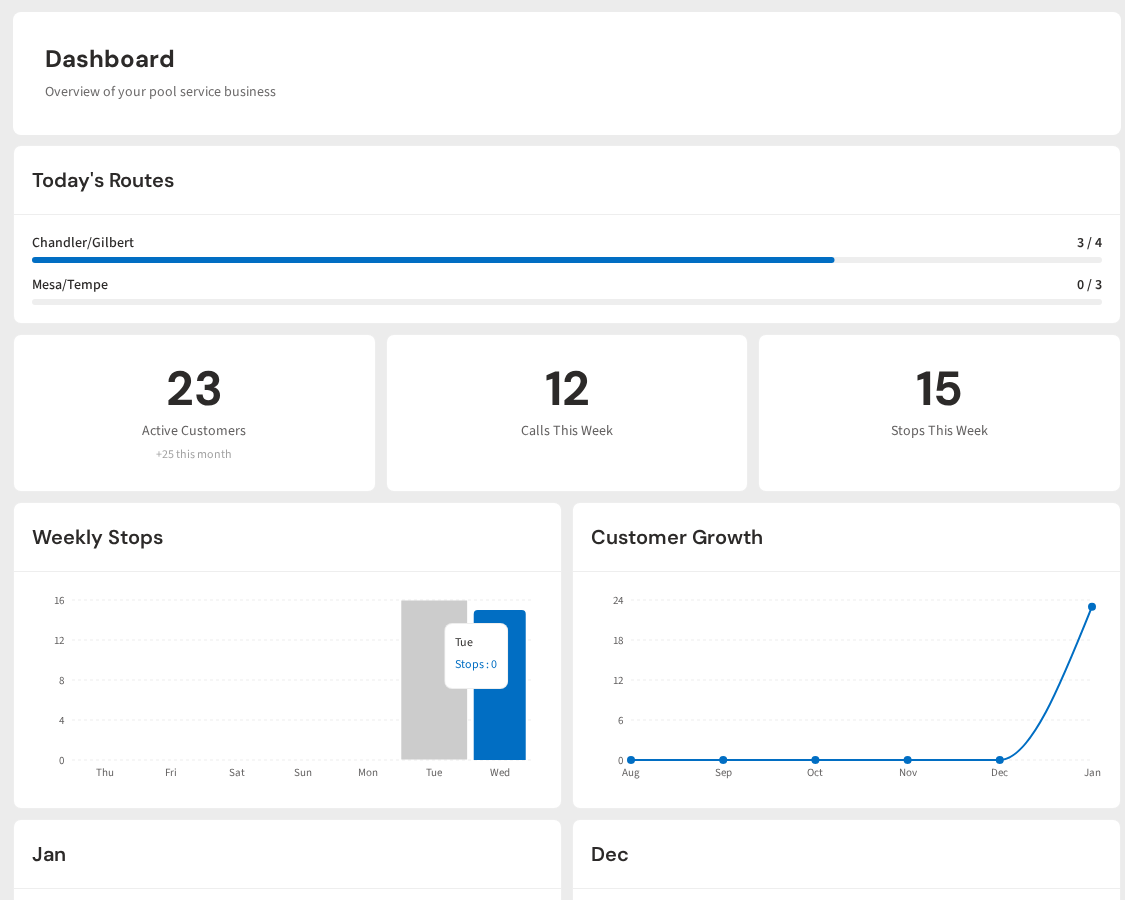
Compare this to a spreadsheet. With a spreadsheet, you are the database, the data entry clerk, the analyst, and the report generator. You do all of it by hand. With PoolDial, you just do your job and the data takes care of itself.
The pool service owners who grow from 50 pools to 150 pools are not the ones who are better at cleaning pools. They're the ones who know their numbers. They know their MRR. They know their churn rate. They know their seasonal patterns. They know when to hire, when to raise prices, and when to invest. And they know all of this because they use tools that track it automatically, not spreadsheets that depend on Sunday night discipline.
If you are still using a spreadsheet and it's working, keep using it. But if you have noticed the cracks, if the numbers don't quite add up, if you avoid updating it because it takes too long, that's your sign. You've outgrown the spreadsheet. It's time for something better.
Know Your Numbers Without the Data Entry
PoolDial tracks MRR, past-due amounts, seasonal trends, and revenue by service type automatically. No spreadsheet required. Plans start at $2/pool.
Start Your Free Trial