
How to Set Up Autopay for Pool Service Customers


You clean pools for a living. You shouldn't have to spend your evenings chasing checks. But that's what happens when you bill after the fact and hope customers pay on time. Some do. Some take two weeks. Some take a month. And a few just stop paying and hope you don't notice.
Autopay fixes all of it. The card gets charged. The money shows up. You move on with your life.
Key Takeaways
- Autopay means you get paid every time, on time. No chasing, no reminders, no awkward phone calls.
- Bill at the beginning of the month, not the end. Get paid before you do the work, not after.
- Require a card on file for all new customers. Make it part of signup, not an afterthought.
- Most customers won't push back. People pay for everything else with a card. Pool service is no different.
- Processing fees are worth it. The 2-3% fee costs less than the time you spend chasing late payments.
Why Autopay Changes Everything
Cash flow is the number one problem for growing pool companies. You do the work in January, send the invoice February 1st, and maybe get paid by February 15th. That's 45 days between doing the work and seeing the money. Now multiply that by 80 pools.
With autopay, you bill on the 1st and the money hits your account within 2-3 days. Every customer. Every month. No exceptions. That kind of cash flow lets you buy chemicals in bulk, hire help when you need it, and stop worrying about whether you can cover payroll. PoolDial's billing runs autopay on the date you set and deposits the money straight to your bank.
The Two-Part Setup
Autopay has two pieces. You need both to make it work.
1. Card on file. Every customer gives you a credit or debit card number that stays stored in your billing system. You don't write it on a sticky note. Your software holds it securely.
2. Billing in advance. You charge the card at the start of the month for that month's service. Not at the end. Not after you've done the work. Before.
Billing in advance feels weird at first. But think about it. Your gym charges on the 1st. Your phone company charges on the 1st. Netflix charges on the 1st. Pool service is a monthly subscription. Treat it like one. PoolDial stores card info securely through Stripe so you never handle the numbers yourself.
How to Switch Existing Customers
The hardest part is moving customers who are used to checks or end-of-month invoices. Here's how to do it without losing anyone.
- Pick a date. "Starting March 1st, all accounts move to autopay." Give 30 days notice.
- Send one message to everyone. Use broadcast messaging to text or email all customers at once. Keep it short: "We're updating our billing to make things easier. Starting next month, your card on file will be charged on the 1st."
- Give two options, not one. Credit card on file with auto-charge, or ACH bank transfer. Both are autopay. Let them pick which one.
- Don't apologize. You're not asking for a favor. You're running a business. Every other service company works this way.
PoolDial's broadcast messaging lets you send the autopay switch notice to all customers at once.
Handling Pushback
Most customers will say OK and move on. A few will push back. Here's how to handle the common objections:
| What They Say | What You Say |
|---|---|
| "I don't like giving out my card number" | "Your card info is stored securely by Stripe, the same company that handles payments for Amazon and Shopify. We never see or store the full number." |
| "I prefer to pay by check" | "We understand. We can also set up ACH, which pulls directly from your bank. No card needed." |
| "What if I want to cancel?" | "You can cancel anytime with 30 days notice. We'll stop the charges immediately." |
| "Why do I have to pay in advance?" | "It works like any other monthly service. It helps us keep prices stable and focus on your pool instead of billing." |
For the rare customer who flat-out refuses, you have a choice. Keep them on manual billing if they're a good customer in a good zone. Or let them go. One manual-pay customer out of 80 is fine. Twenty is a headache. PoolDial tracks which customers are on autopay and which still pay manually, so you always know where you stand.
New Customers: Make It Default
The easiest way to get everyone on autopay is to start every new customer that way. Don't offer check or invoice as an option. When you sign them up, the card goes on file as part of the process. That's it.
Your service agreement should include a line about autopay. Something like: "Service is billed on the 1st of each month. A credit card or bank account on file is required." When it's in the agreement from day one, nobody questions it. For pricing help, check our service price calculator and our pricing guide. PoolDial sends new customers a secure link to add their card as part of onboarding.
What About Processing Fees?
Credit card processing costs 2.5% to 3% per charge. On a $160 monthly service, that's about $4.50. Some pool pros see that and cringe. But think about what manual billing costs you:
- Time. 15-20 minutes per customer per month to create, send, and follow up on invoices. At 80 pools, that's 20+ hours a month.
- Late payments. 10-20% of manual invoices are late. Chasing each one takes a phone call or text. That's more time.
- Bad debt. 1-3% of invoices never get paid at all. On $12,000/month in revenue, that's $120-360 gone.
The $4.50 per customer is the cheapest employee you'll ever hire. It collects every payment, on time, every month, without a single phone call. PoolDial's billing dashboard shows your total processing fees so you can track the cost at a glance.
Failed Payments: What Happens Next
Cards expire. Banks decline. It happens. A good billing system handles this automatically:
- First attempt fails. The system waits 3 days and tries again. Most declined cards clear up on their own.
- Second attempt fails. The customer gets an automatic text or email: "Your payment didn't go through. Please update your card."
- Still no payment after 7-10 days. You reach out personally. At this point it's usually an expired card, not a customer trying to skip out.
PoolDial's billing system handles retry logic and sends automatic reminders. You only get involved when something needs a human touch.
See It in Action: PoolDial Billing
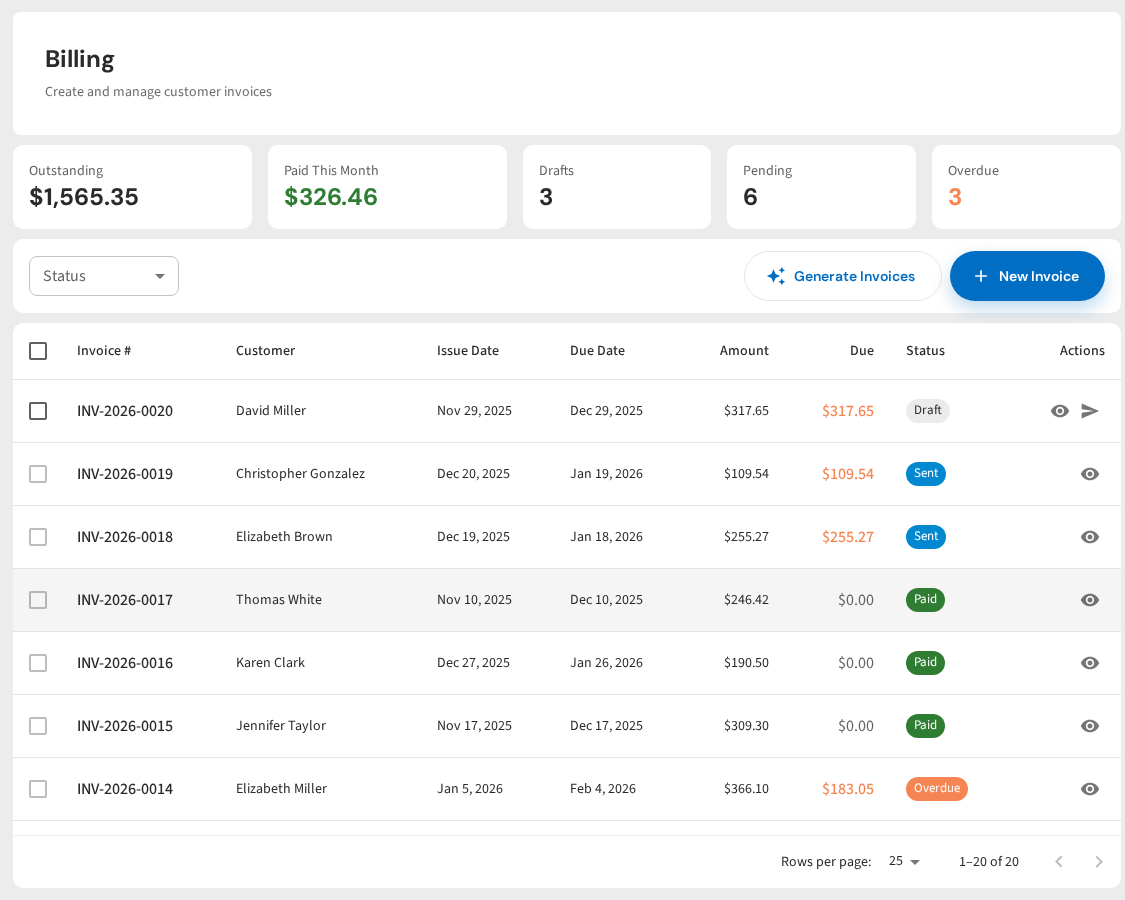
PoolDial makes autopay simple. Customers add their card through a secure link. Bills go out on the 1st. Cards get charged automatically. Failed payments get retried and customers get notified. You see who's paid and who hasn't on one screen.
Stop Chasing Checks
PoolDial autopay charges cards on the 1st, handles failed payments, and puts cash in your account. Plans start at $2/pool.
Start Your Free Trial