
How to Handle Late-Paying Pool Customers Without Losing Them


Every pool company has at least one. The customer who's always 30 days behind. The one who says "check's in the mail" every time you call. The one who owes you for three months but still expects you to show up on Tuesday.
Late payments cost you money and time. But handling them wrong costs you the customer. Here's how to collect what you're owed without burning the relationship.
Key Takeaways
- Have a written process. Follow the same steps for every late payment. No guessing, no emotions.
- Automate your reminders. Let PoolDial send the first two nudges so you don't have to.
- Pause service, don't cancel. Stopping service gets attention without ending the relationship.
- Most late payers aren't bad people. They forgot, lost the invoice, or had a card expire. Make it easy to fix.
- The best cure is prevention. Autopay eliminates late payments before they start.
Why Customers Pay Late
Before you get frustrated, understand why it happens. Most late payers aren't trying to cheat you. Here are the real reasons:
- They forgot. Life is busy. Your invoice got buried in their email. This is the most common reason by far.
- Card expired. Their autopay failed and they didn't see the notice. PoolDial's billing system retries failed cards and sends automatic alerts, but some people still miss them.
- They're unhappy. Sometimes late payment is passive resistance. They don't want to call and complain, so they just stop paying. This is the one you need to catch early.
- Money is tight. They can't afford the bill right now but don't want to admit it. This is less common than you think, but it happens.
The 4-Step Late Payment Process
Every late payment should follow the same process. Write it down. Put it in your service agreement. Follow it every time. No exceptions. PoolDial tracks payment status for every customer, so you always know who's behind.
| Step | When | What Happens |
|---|---|---|
| 1. Auto reminder | 3 days past due | PoolDial sends an automatic text or email: "Your payment of $160 is past due. Tap here to pay." |
| 2. Second reminder | 7 days past due | Another automatic message: "Your account is 7 days past due. Please update your payment to avoid service interruption." |
| 3. Personal call | 14 days past due | You or your office calls the customer. Keep it friendly. "Hey, just checking in. We noticed your payment didn't go through." |
| 4. Pause service | 30 days past due | Service stops until payment is made. Send a final notice: "Your account is 30 days past due. Service has been paused until your balance is cleared." |
The key is that steps 1 and 2 happen without you doing anything. PoolDial handles them. You only get involved at step 3, when it's clear the automatic reminders didn't work.
What to Say When You Call
The phone call at step 3 is the hardest part. Most pool pros hate it. You got into this business to clean pools, not chase money. But a 2-minute call can save a $160/month account.
Keep it simple and friendly. Don't accuse. Don't threaten. Just ask:
- "Hey, this is [your name] from [company]. I noticed your payment didn't go through this month. Just wanted to check if there's anything on our end we can fix."
- If it's a card issue: "No problem. I can send you a link to update your card right now." PoolDial lets you send a secure card update link by text in seconds.
- If they're unhappy: "Is there anything about the service you'd like us to address?" Sometimes fixing a small complaint saves the account and gets you paid.
- If money is tight: "Would it help to split this into two payments?" Be flexible, but get a commitment with a date.
When to Pause Service
Pausing service is your best tool. It's not canceling. It's pressing pause until the bill is paid. The pool still exists. The customer still wants it clean. They just need a reason to pay, and a green pool is a strong reason.
Rules for pausing:
- Give clear warning. Never just stop showing up. Send a written notice first. PoolDial's messaging tools make this easy.
- Pause, don't cancel. Tell them service will resume as soon as payment is made. The door stays open.
- Don't wait too long. 30 days is the right cutoff for most companies. At 60 or 90 days, you're doing free work and the debt is harder to collect.
- Put it in your service agreement. "Accounts 30+ days past due will have service suspended until the balance is cleared." When it's in the contract, it's not personal. It's policy. Check our pricing guide for what to include in agreements.
A Late Fee Is Not the Collection System
One two-owner pool company described customers dodging texts and emails and considered adding a late fee to force a conversation:
"We are about to implement a late fee to at least try and open a conversation about paying us."
— Pool pro via Reddit
The conversation should already be part of the process. Put the due date, reminder schedule, late fee, service-pause date, restart terms, and collection cutoff in the agreement before work begins. Send each reminder through a recorded channel and make it easy to pay. A fee can compensate for delay and encourage timely payment, but it cannot replace a clear stop-service rule for an account that will not respond.
Late Fees: Should You Charge Them?
Late fees are common in other industries but less common in pool service. Here's the trade-off:
| With Late Fees | Without Late Fees |
|---|---|
| Creates urgency to pay on time | Simpler billing. Fewer disputes. |
| Covers your cost of chasing payment | Less friction when customers are a few days late |
| Can feel punitive to good customers who slip once | Relies on autopay to prevent lateness |
| Must be in service agreement to enforce | Pausing service is often more effective than a $15 fee |
If you use PoolDial's autopay, late fees become mostly irrelevant. The card charges automatically. The only "late" payments are failed cards, and those are usually fixed with a quick text.
Prevent Late Payments Before They Start
The best way to handle late payments is to never have them. Here's what works:
- Require autopay for all new customers. Card on file, charged on the 1st. No exceptions. PoolDial makes this the default during signup.
- Bill in advance. Charge for the month before you do the work. If they don't pay, you haven't lost labor and chemicals on unpaid service.
- Send invoices the same day every month. PoolDial sends them automatically. Customers learn to expect them and pay without thinking.
- Make paying easy. A text with a one-tap pay link gets paid faster than an email with a PDF. PoolDial's billing sends both.
The 2-3% credit card processing fee is the cheapest insurance against late payments you'll ever find. For more on this, read our guide on setting up autopay.
When to Let a Customer Go
Some customers are not worth keeping. If someone is 60+ days behind, ignoring your calls, and has a history of late payment, it's time to move on. PoolDial's analytics can show you which customers are chronic late payers so you can spot patterns.
How to end it cleanly:
- Send a final invoice for all outstanding charges.
- Give 30 days notice that you're ending service.
- Be polite but firm. "We're not the right fit for each other. I'd recommend [competitor name] for your area."
- Replace them with a customer in your density zone who pays on time. One good customer is worth more than two who don't pay.
See It in Action: PoolDial Billing
PoolDial automates the entire late payment process. Auto-reminders go out at 3 and 7 days. You see every overdue account on one screen. Send a pay link by text with one tap. Pause service with a click. And when you switch everyone to autopay, late payments almost disappear.
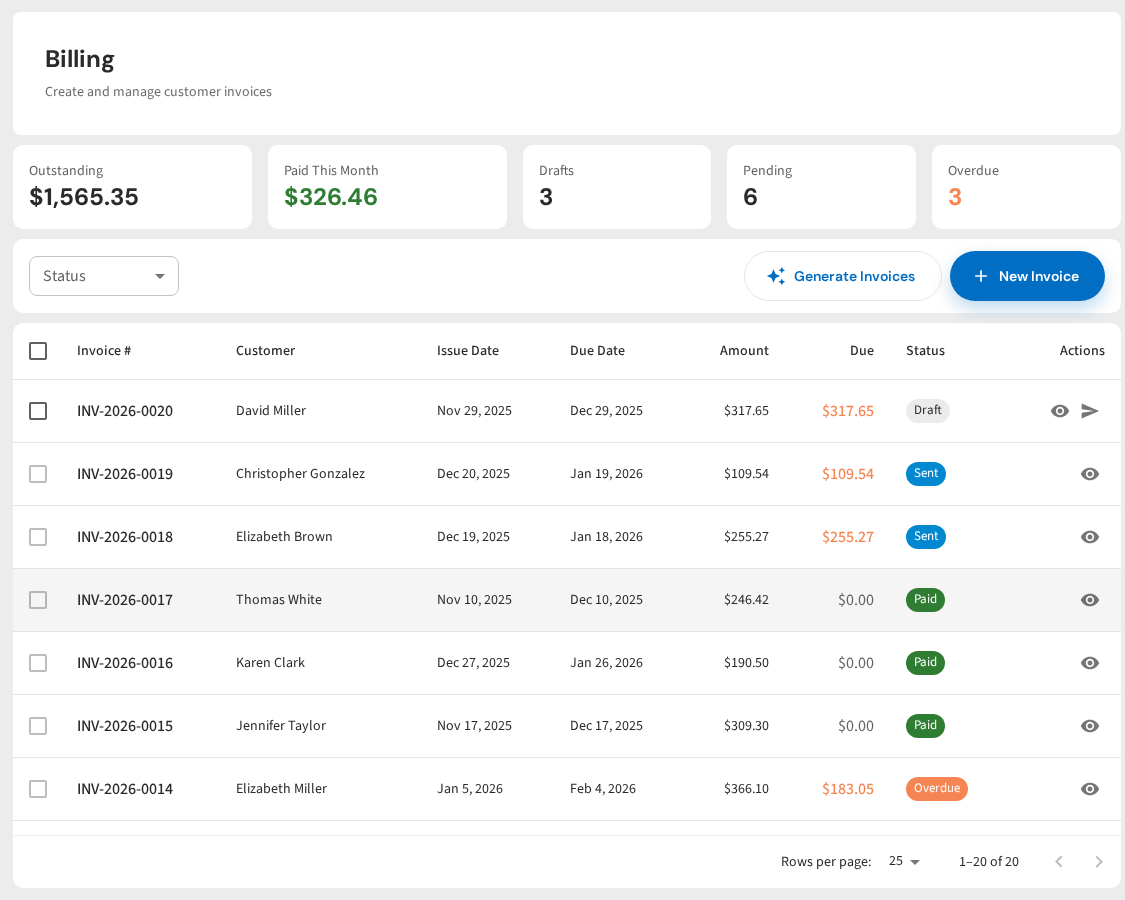
No More Chasing Late Payments
PoolDial sends reminders, retries failed cards, and shows you who owes what. Autopay means you get paid on time, every time. Plans start at $2/pool.
Start Your Free Trial