
Tracking One-Time Jobs and Repairs Alongside Recurring Pool Service



You run 120 pools a week. Your schedule is tight. Every day you hit the same houses in the same order. Then a customer calls about a green pool. Another one needs a filter clean. A third wants you to open their pool for the season. Where do these jobs go?
If you are like most pool pros, one-time jobs end up on a sticky note. Or in a text thread. Or in your head. And that is why they fall through the cracks. Your whole system is built for recurring stops. One-time work does not fit. So it gets lost.
This is one of the biggest money leaks in pool service. A green-to-clean pays $300 to $600. A pump swap pays $400 to $800. A seasonal opening pays $150 to $300. These jobs add up fast. But only if you actually track them, finish them, and bill for them.
This guide walks you through how to handle one-time jobs the right way. You will learn how to capture them, schedule them, bill them, and keep them separate from your weekly route. All without losing a single job in the shuffle.
Key Takeaways
- One-time jobs need their own system. Do not try to squeeze them into your recurring route. Use work orders to track them.
- Capture every job the moment you hear about it. If it only lives in someone's head, it will get lost.
- Schedule one-time jobs around your route, not on top of it. Use gaps in your day or set aside blocks of time.
- Bill one-time jobs separately from monthly service. The customer should see a clear line item for the extra work.
- Follow up after every one-time job. Make sure it is done, billed, and the customer is happy.
Why One-Time Jobs Fall Through the Cracks in PoolDial
Your pool business runs on routines. Monday is the east side. Tuesday is the north side. Every week, same pools, same order. Your software, your truck, and your brain are all set up for this pattern.
One-time jobs break the pattern. They show up at random. They come from different places. And they do not repeat. That makes them easy to forget.
Here are the most common types of one-time jobs that pool companies handle:
| Job Type | Typical Price | Time Needed | When It Comes Up |
|---|---|---|---|
| Green-to-clean | $300 - $600 | 2 - 4 hours + return visits | Spring, after storms, new customers |
| Filter clean | $75 - $200 | 30 - 90 minutes | Quarterly or as needed |
| Equipment repair | $150 - $800+ | 1 - 3 hours | Anytime something breaks |
| Pool opening | $150 - $350 | 1 - 2 hours | Spring season |
| Pool closing | $150 - $350 | 1 - 2 hours | Fall season |
| Acid wash | $400 - $800 | 4 - 8 hours | Every few years or new customer |
| Tile cleaning | $200 - $500 | 2 - 4 hours | As needed |
Every one of these jobs is money on the table. But here is why they get lost:
- No place to write them down. Your route software tracks recurring stops. Where do you put a one-time filter clean? Most people just try to remember.
- Too busy to stop and log it. Your tech has 18 pools to hit today. Stopping to call the office about a repair request feels like a waste of time.
- No clear owner. The customer mentions a green pool to the tech. The tech tells you at the end of the day. You say you will handle it. Nobody writes it down. A week later, the customer calls asking where you are.
- No billing trigger. The tech does the filter clean. He forgets to tell the office. Nobody sends an invoice. You just did $150 of work for free.
PoolDial fixes this by giving one-time jobs their own home. Work orders live next to your recurring route but stay separate from it. You can see both at once without mixing them up.
How to Capture One-Time Jobs in PoolDial
A one-time job can come from anywhere. Your tech spots something in the field. A customer calls the office. Someone texts you on the weekend. The AI receptionist takes a message at 9 pm. No matter where it starts, it needs to end up in the same place.
PoolDial gives you three ways to capture one-time jobs. Each one creates a work order that the whole team can see.
1. Tech in the Field
Your tech is cleaning a pool and notices the filter pressure is at 28 PSI. The filter needs a clean. Instead of making a mental note, he opens the PoolDial app. He taps the customer. He taps "New Work Order." He types "DE filter clean needed, pressure at 28 PSI" and snaps a photo of the gauge. Done. The office sees it right away. The whole thing takes 30 seconds.
2. Customer Call to the Office
Mrs. Davis calls and says her pool is green after a week of rain. The person answering the phone opens PoolDial, pulls up her customer record, and creates a work order. "Green pool after storm. Customer wants green-to-clean ASAP." The job is in the system before the phone call ends. No sticky notes. No scraps of paper.
3. AI Receptionist After Hours
A customer calls at 8 pm on a Saturday. Your AI receptionist answers. The customer says their pump stopped working. The AI logs the call details and creates a work order in PoolDial. When you open your phone on Monday morning, the job is already waiting for you. Nothing fell through the cracks over the weekend.
The rule is simple: if someone tells you about a job, create the work order before you do anything else. Before you drive to the next stop. Before you finish the call. Before you walk away. The moment you say "I will get to it later," you are gambling that you will remember. Most of the time, you will not.
For more on how to handle the full repair request process, check our guide on managing repair requests from start to finish.
Work Orders vs. Route Stops: When to Use Each in PoolDial
This is where a lot of pool pros get confused. Should you add the one-time job to your route? Or should you create a work order? PoolDial supports both, but they serve different purposes.
| Feature | Route Stop | Work Order |
|---|---|---|
| Best for | Recurring weekly/biweekly service | One-time jobs and repairs |
| Repeats | Yes, on a set schedule | No, it is a single event |
| Billing | Included in monthly service fee | Billed as a separate line item |
| Scheduling | Locked to a day of the week | Flexible, any day you choose |
| Status tracking | Complete or skip each week | Open, in progress, complete |
| Shows on route | Every week automatically | Only on the scheduled date |
Here is the simple rule: if the job repeats on a schedule, it is a route stop. If it happens once and is done, it is a work order.
Some examples:
- Weekly pool cleaning = route stop
- Filter clean this Thursday = work order
- Monthly chemical check = route stop
- Replace a broken pump motor = work order
- Spring pool opening = work order
- Weekly brush and vacuum = route stop
The danger is when you try to use your route for everything. If you add a one-time job as a route stop, you have to remember to remove it after. If you forget, it sits on your route forever. Or you skip it every week and it clutters up your schedule. PoolDial work orders avoid this problem. They close when the job is done and stay out of your way after that.
Scheduling One-Time Jobs Around Your Route in PoolDial
You have 22 pools on your Tuesday route. You also have a green-to-clean and a filter clean to squeeze in. How do you fit them in without wrecking your day?
There are three ways to schedule one-time jobs with PoolDial. Pick the one that fits your workload.
Strategy 1: Morning or Afternoon Blocks
Set aside the first two hours of your day or the last two hours for one-time jobs. Run your regular route in between. This works well if you have one or two extra jobs per day. You know exactly when you will get to them, and your route stays on track.
Strategy 2: Light Day Scheduling
Most pool pros have one day that is lighter than the rest. Maybe Friday only has 14 stops instead of 22. Stack your one-time jobs on that day. You have the time and the energy. This works great for bigger jobs like green-to-cleans and acid washes that take two or more hours.
Strategy 3: Nearby Scheduling
When a one-time job comes in, check your route map in PoolDial. Find the day when you are already in that part of town. Schedule the work order for that day. You save drive time and the job fits into your existing flow. A filter clean at a house two streets over from your regular stop barely adds any time to your day.
Whatever strategy you use, the key is to put the job on a real date. "Sometime next week" is not a schedule. That is a hope. PoolDial lets you pick a date and assign a tech. The tech sees it on their daily schedule right next to their regular route stops. There is no guessing about what needs to happen today.
A few more tips for scheduling one-time work:
- Check parts before you schedule. If you need a new motor, make sure it is on your truck before you send a tech out. A wasted trip costs you an hour and annoys the customer.
- Leave buffer time. A filter clean might take 45 minutes or it might take 90. Do not schedule it between two tight route stops. Give yourself room.
- Tell the customer the date and window. "Thursday between 10 and 1" is much better than "sometime this week." The customer knows when to expect you. You look like a pro.
- Do not overload one day. If you already have 24 route stops, adding two filter cleans and a pump repair will put you behind. Spread one-time jobs across the week.
For the full step-by-step on creating and managing work orders, see our work order process guide.
Billing One-Time Jobs Separately in PoolDial
This is where a lot of pool companies leave money on the table. The tech does the job. But nobody sends the bill. Or the charge gets lumped into the monthly service and the customer does not realize they owe more. Or the bill goes out three weeks later and the customer has already forgotten what the work was for.
One-time jobs need to be billed on their own. Separate from monthly service. Clear and easy for the customer to understand.
Here is how PoolDial handles it:
- Add charges to the work order. When the tech finishes the job, he adds the cost right from his phone. Parts, labor, and any other charges. It takes 60 seconds.
- The charge shows up on the customer's next invoice. PoolDial billing picks it up automatically. The customer sees their regular monthly service on one line and the one-time job on another.
- Send a quote first for big jobs. If the repair is going to cost $500 or more, get approval before you start. PoolDial lets you create a quote and send it to the customer. When they approve, you convert it to a work order with one tap.
| Billing Method | Good For | Watch Out For |
|---|---|---|
| Add to next monthly invoice | Small jobs under $200 | Customer may not remember the work if the invoice is delayed |
| Separate invoice right away | Big repairs, equipment swaps | More invoices to manage |
| Collect payment on site | Non-recurring customers | Tech needs to handle payment |
| Quote first, then invoice | Jobs over $500 | Adds a step, but protects you from disputes |
Rules for billing one-time jobs with PoolDial:
- Add the charge the same day the work is done. Not tomorrow. Not next week. Today. The longer you wait, the more likely you forget.
- Break out parts and labor. Customers want to see what they are paying for. "Pump motor: $280. Labor: $120" is much better than "Pump repair: $400."
- Do not discount one-time work. These jobs take time, skill, and materials. Charge what they are worth. If you are not sure what to charge, look at what other pros in your area charge on poolrates.fyi.
- Track your costs. Know how much the part cost you, how long the job took, and how far you drove. If you are not making at least 40% margin on a repair, your price is too low.
Tracking Completion and Follow-Up in PoolDial
A one-time job is not done when the tech finishes turning the wrench. It is done when the customer is happy, the work order is closed, and the bill is paid. That means you need a system for follow-up.
PoolDial work orders move through three stages:
| Stage | What Happens | Who Is Responsible |
|---|---|---|
| Open | Job is logged. Needs to be assigned and scheduled. | Office or owner |
| In Progress | Tech is working on it. May be waiting on parts. | Assigned tech |
| Complete | Work is done. Charges are added. Customer is notified. | Tech marks it done, office handles billing |
The follow-up steps after a one-time job are simple. But they make a big difference in how your customer feels about the service.
- Tech marks the work order complete. He adds notes about what was done. "Replaced DE grids, recharged with 6 lbs DE, pressure now at 12 PSI." He snaps a photo of the finished work.
- Office reviews the work order. Are the charges correct? Did the tech include parts and labor? Is everything documented?
- Send the customer a message. "Hi Mrs. Davis, your filter clean is done. Pressure is back to normal. You will see the charge on your next invoice." PoolDial keeps all customer communication in one place so the whole team can see what was said.
- Close the work order. Once the bill is paid, close it. It moves to your completed list. You can always pull it up later for reference.
Build a habit of reviewing open work orders every morning. It takes two minutes. Open PoolDial. Look at the work order list. Check that nothing has been sitting in "open" for more than a few days. If something is stuck, figure out why and fix it.
Some one-time jobs need return visits. A green-to-clean usually takes two or three trips. The first visit is the shock and brush. The second is the vacuum and backwash. Sometimes there is a third visit to clean the filter and check chemistry. PoolDial lets you add notes and updates to the same work order each time. You can see the full history of the job in one place.
Common One-Time Job Workflows in PoolDial
Every type of one-time job has its own flow. Here are step-by-step guides for the most common ones. Each workflow uses PoolDial work orders to track the job from start to finish.
Green-to-Clean Workflow
Day 1: Create work order. Visit the pool. Check the equipment. Triple shock. Brush walls and floor. Run the pump 24/7. Take before photos.
Day 2-3: Return visit. Vacuum dead algae to waste. Backwash filter. Add more chlorine if needed. Update the work order with notes.
Day 3-5: Final visit. Water should be clear. Clean the filter. Balance chemistry. Take after photos. Mark work order complete. Add charges: typically $300-$600 for a standard residential pool. The customer sees before and after photos in PoolDial and knows exactly what they paid for.
Equipment Repair Workflow
Step 1: Create work order with the problem description. Include the equipment make and model. Take photos of the broken part and the data plate.
Step 2: Create a quote in PoolDial with parts and labor. Send it to the customer for approval.
Step 3: Order the part. Update the work order with tracking info and expected arrival date.
Step 4: Schedule the repair for the day after the part arrives. Assign to the right tech.
Step 5: Tech does the repair. Adds notes and photos. Marks complete. Charges are added to the invoice automatically through PoolDial billing.
Pool Opening Workflow
Step 1: Create work orders in bulk at the start of spring. PoolDial lets you create a work order for each customer who needs an opening.
Step 2: Schedule them across two to three weeks. Group by area to save drive time. Use the route map to plan the most efficient order.
Step 3: Tech does the opening. Remove cover, clean cover, start up equipment, check for leaks, shock the pool, add startup chemicals. Log everything in the work order.
Step 4: Mark complete. Add the opening charge. Customer sees it on their next bill.
Filter Clean Workflow
Step 1: Tech notices high filter pressure during a regular route stop. Creates a work order from the field in PoolDial. "Filter pressure at 28 PSI, needs cleaning."
Step 2: Office schedules the filter clean for the same day the tech is already in the area.
Step 3: Tech does the clean. Disassembles the filter, cleans grids or cartridges, reassembles, checks for damaged parts. Adds notes and photos.
Step 4: Marks complete. Adds the charge. Done.
How PoolDial Keeps Recurring and One-Time Work Connected
The biggest problem with tracking one-time jobs is keeping them connected to the rest of your business. You need to see the full picture for each customer. How many times have you serviced their pool this month? What repairs have been done? What equipment is on site? What are they paying you?
PoolDial ties everything together. Here is how the system works:
- Customer record is the hub. Every customer in PoolDial has a profile. Their route stops, work orders, equipment, billing history, and notes all live in one place. When you open a customer's profile, you see their full history. Recurring service on the left. One-time work orders on the right.
- Work orders are linked to customers. Every work order is tied to a customer and a property. You always know whose pool you are working on and where it is.
- Billing is unified. Monthly service charges and one-time job charges all show up on the same invoice. The customer gets one bill. You do not have to manage two billing systems.
- The daily schedule shows both. When a tech opens PoolDial in the morning, they see their regular route stops and any work orders scheduled for that day. Everything in one list. Nothing hidden in a separate app or spreadsheet.
- Reports cover all revenue. When you look at your monthly revenue in PoolDial, you see recurring service income and one-time job income together. You can break them apart to see how much each type brings in. This helps you understand how much of your business depends on one-time work and where the growth is coming from.
This is what makes PoolDial different from tracking jobs in a spreadsheet or a notebook. Everything is connected. The customer. The route. The work order. The bill. The tech. One system holds it all.
Compare this to what most pool pros do today:
| Task | Without PoolDial | With PoolDial |
|---|---|---|
| Capture a job request | Sticky note, text thread, or memory | Work order created in 30 seconds |
| Assign it to a tech | Verbal, text message, or phone call | Assigned in the app, tech sees it on their schedule |
| Track progress | Ask the tech "did you do that job?" | Open, in progress, complete status visible to all |
| Bill the customer | Remember to send a separate invoice weeks later | Charge added when job is done, appears on next invoice |
| Find past work | Dig through texts, emails, and notebooks | Search the customer's work order history |
Building a One-Time Job Process for Your Team in PoolDial
Having the right software is only half the battle. You also need a clear process that every person on your team follows. Otherwise, one tech logs jobs in PoolDial and the other one still texts you photos with no context.
Here is a simple process you can put in place today. Print it out. Tape it to the dashboard of every truck. Go over it in your next team meeting.
- Hear about a job? Create a work order. Do not wait. Do not write it on your hand. Open PoolDial and create the work order now. Include a description, photos, and the customer name.
- Office reviews new work orders every morning. Assign each one to a tech. Pick a date. Make sure parts are available.
- Tech checks PoolDial at the start of each day. He sees his regular route stops and any work orders scheduled for today. He knows what to bring on the truck.
- Tech does the job and marks it complete. He adds notes about what was done. He adds photos of the finished work. He adds the charge.
- Office sends the customer a follow-up message. "Your filter clean is done. You will see the charge on your next invoice."
- Office closes the work order after the bill is paid. Job is done. Move on to the next one.
That is six steps. Every person on your team can learn this in one meeting. The key is consistency. If everyone follows the same steps, nothing gets lost. If one person skips a step, jobs start falling through the cracks again.
Some extra tips for making this process stick:
- Review work orders in your weekly team meeting. Pull up the work order list in PoolDial. Go through any that are still open. Ask why. Fix the bottleneck.
- Track your one-time job revenue. At the end of each month, look at how much money came from one-time work. If you are doing $5,000 in one-time jobs and only $500 is showing up on invoices, you have a billing problem.
- Reward techs who log jobs well. The tech who creates detailed work orders with photos and notes saves the office hours of follow-up. Make sure they know you appreciate it.
- Use PoolDial work orders for everything. Not just repairs. Filter cleans, pool openings, acid washes, tile cleaning, salt cell cleaning. If it is not on the regular route, it is a work order. No exceptions.
For more details on how to write good work orders, check out our work order process guide.
See It in Action: PoolDial Work Orders
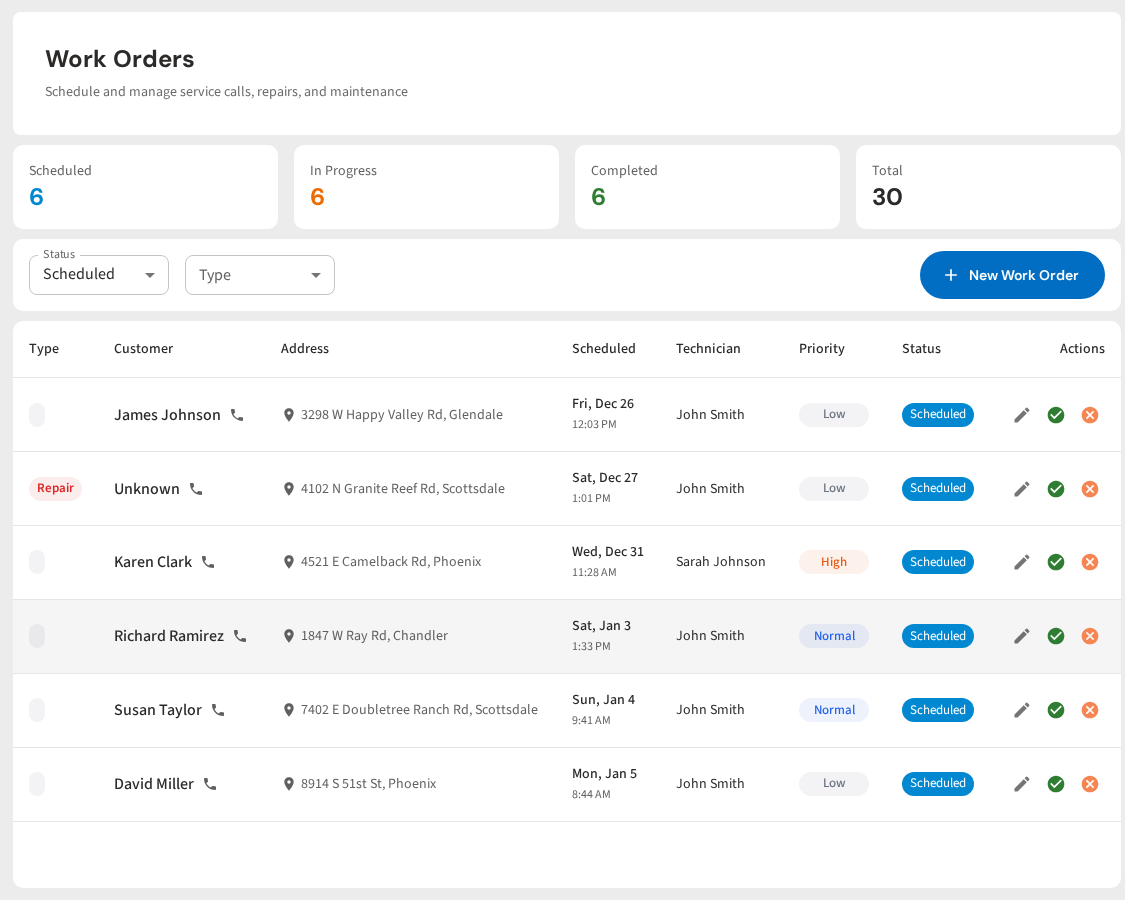
PoolDial gives you one place to track every one-time job. Filter cleans, green-to-cleans, equipment repairs, pool openings, pool closings. All of it lives in the same system as your recurring route. Create a work order from the field or the office. Assign it to a tech and pick a date. Track it from open to complete. Bill for it automatically. Follow up with the customer. Close it out. Nothing gets lost.
Stop Losing One-Time Job Revenue
PoolDial tracks every one-time job from the moment it comes in to the moment you get paid. Work orders, scheduling, follow-ups, and billing in one place. Plans start at $2/pool.
Start Your Free Trial