
How to Manage Pool Repair Requests Without Dropping the Ball



Your tech finds a cracked pump housing on a Tuesday morning. He tells the homeowner. The homeowner says "yeah, fix it." Your tech drives to the next stop and forgets to tell the office. Two weeks later the customer calls, upset. Nobody ever came back.
Or this one: a customer calls the office about a leak near the return jets. Whoever answers the phone writes it on a sticky note. The sticky note ends up under a coffee mug. The customer calls again a week later, even more upset.
Repair requests are where pool companies lose trust. The work itself is usually simple. The hard part is tracking every request from the moment it comes in to the moment the customer pays the bill. Here is how to do it right.
Key Takeaways
- Write every repair request down the moment you hear it. If it only exists in someone's head, it will get lost.
- Use work orders, not memory. PoolDial lets you create a work order from the field or the office in seconds.
- Assign every job to a person and a date. Unassigned work orders sit forever.
- Keep the customer in the loop. A quick text when the job is scheduled and when it is done builds trust.
- Bill for the repair right away. The longer you wait, the harder it is to collect.
Why Repair Requests Fall Through the Cracks in PoolDial
Most pool companies are set up to handle weekly service. Routes, chemical logs, billing. That part runs like clockwork. But repairs are different. They are unplanned. They pop up at random times from random places.
Here are the most common ways repair requests get lost:
- The tech tells the customer but not the office. The tech is busy. He has 15 more stops. He means to call it in but never does.
- The office gets a call but has no system to track it. Sticky notes, text threads, and email chains are not systems. They are piles.
- Nobody is assigned to the job. Everyone assumes someone else is handling it.
- There is no follow-up. The repair gets done but nobody tells the customer. Or nobody bills for it.
The fix for all of these is the same: a work order system that captures, assigns, tracks, and closes every repair.
Capturing Repair Requests in PoolDial
A repair request can come from anywhere. Your tech spots a problem in the field. A customer calls the office. Someone sends a text. The homeowner flags you down in the driveway. No matter where it starts, it needs to end up in the same place.
In PoolDial, you can create a work order from your phone while standing at the pool. Tap the customer, tap "New Work Order," type what is wrong, and snap a photo. It takes about 30 seconds. The office sees it right away.
If the request comes from a phone call, the office can create the work order from the dashboard. Either way, the request is now in the system. It is tied to a customer. It has a description. It is not going to get lost under a coffee mug.
The key rule: if someone tells you about a problem, create the work order before you do anything else. Before you drive to the next stop. Before you finish the phone call. Before you forget.
Creating a Work Order in PoolDial
A good work order has five things:
- Customer name and address. PoolDial pulls this from your customer records automatically.
- Description of the problem. Be specific. "Pump is making noise" is not enough. "Pump motor bearing is grinding, pool is 3 years old, Pentair IntelliFlo VSF" is much better.
- Photos. A photo of the broken part saves a trip back to figure out the model number. It also helps when you quote the repair.
- Priority level. A cracked pipe gushing water is urgent. A slow drip from a fitting can wait until next week.
- Equipment details. If the customer's equipment is already logged in PoolDial, you can link the work order to the specific piece of equipment. That way you have a full service history in one place.
The more detail you put in up front, the fewer phone calls and return trips you need later.
Assigning and Scheduling Repairs in PoolDial
An unassigned work order is just a wish. Someone has to own the job.
In PoolDial, you assign the work order to a tech and pick a date. That tech sees it on their schedule. They know what the job is, where it is, and what parts they might need. No more "Hey, can you swing by that house on Elm Street? I think there's something wrong with the pump."
Tips for assigning repairs:
- Assign to the tech who found the problem when you can. They already know the pool and the customer. They saw the issue firsthand.
- Group repairs by area. If you have three repairs on the east side of town, schedule them on the same day. Do not send a tech across town for one job.
- Set a deadline. Even if the repair is not urgent, put a date on it. "Sometime next week" turns into "never" without a date.
- Check parts before scheduling. Make sure you have the motor, the seal kit, or the fitting before you send someone out. A wasted trip costs you gas, time, and the customer's patience.
Tracking Repair Status in PoolDial
Once a repair is assigned, you need to know where it stands. Is the tech waiting on parts? Did they finish the job? Did they bill for it?
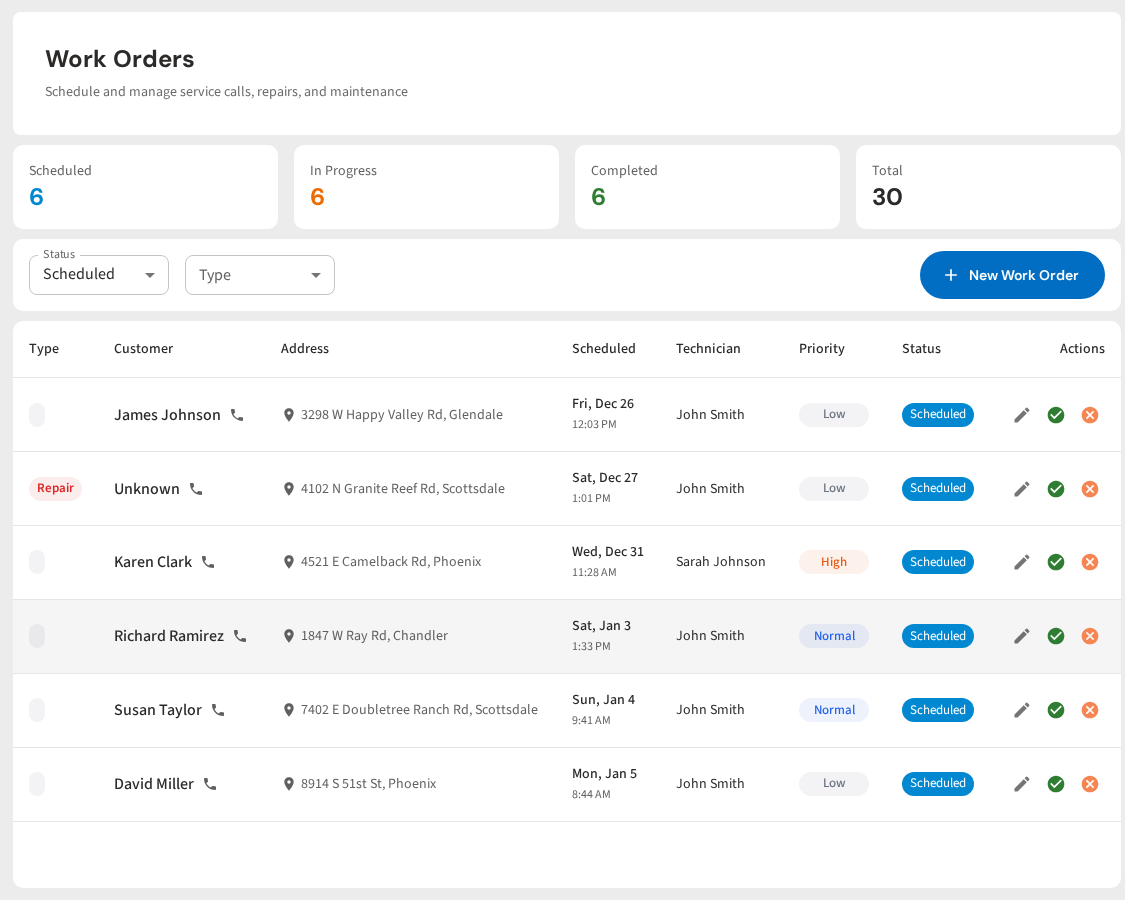
PoolDial work orders move through clear stages: open, in progress, and complete. You can see every open work order on one screen. Filter by tech, by customer, or by date. Nothing hides.
| Status | What It Means | Who Acts |
|---|---|---|
| Open | Request captured, not started yet | Office assigns it and schedules a date |
| In Progress | Tech is working on it or waiting on parts | Tech updates notes as work happens |
| Complete | Repair is done | Office bills the customer and closes the order |
The goal is simple: no work order should sit in "open" for more than a few days without someone looking at it. Build a habit of checking your open work orders every morning. It takes two minutes and keeps everything moving.
Following Up With the Customer Using PoolDial
Customers do not care about your internal process. They care about one thing: is my pool fixed? If you do not tell them what is going on, they assume nothing is happening.
Here is a simple follow-up process:
- When you create the work order: Text the customer. "Hi Mrs. Johnson, we saw the issue with your pump today. We are scheduling the repair and will follow up with a date."
- When you schedule it: Text again. "Your pump repair is scheduled for Thursday between 9 and 12. Mike will be out to handle it."
- When the repair is done: One more text. "All set! Mike replaced the motor seal and tested the pump. Everything is running great. You will see the charge on your next invoice."
Three texts. That is all it takes to make a customer feel like you are on top of things. PoolDial keeps all customer communication in one place, so your whole team can see what has been said.
For more on managing one-time jobs like repairs, check our guide on tracking jobs from start to finish.
Billing for Repairs in PoolDial
The repair is done. The customer is happy. Now get paid.
This is where a lot of pool companies lose money. The tech does the work, but nobody sends the invoice. A week goes by, then two. Now it feels awkward to bill for something you did a month ago. Some companies just eat the cost. That is money you earned walking right out the door.
In PoolDial, you can add a charge to the work order as soon as the job is done. The tech can do it from the field. Parts, labor, travel. It all goes on the work order. When the order is marked complete, the charge shows up on the customer's next invoice through PoolDial billing. No extra steps. No forgotten invoices.
Rules for billing repairs:
- Add the charge the same day the work is done. Not tomorrow. Not next week. Today.
- Include parts and labor. Break it out so the customer can see what they are paying for.
- Get approval before you start expensive repairs. Send the customer a quote first. PoolDial lets you create quotes and convert them into work orders with one tap.
- Do not discount your repair work. Your time, expertise, and the parts all cost money. Charge what it is worth.
See It in Action: PoolDial Work Orders
PoolDial gives you one place to capture every repair request, assign it, track it, and bill for it. No sticky notes. No forgotten follow-ups. No lost revenue. Every work order is tied to a customer, a tech, and a date. You can see your full repair pipeline at a glance.
Stop Losing Repair Revenue
PoolDial tracks every repair request from the moment it comes in to the moment you get paid. Work orders, scheduling, follow-ups, and billing in one place. Plans start at $2/pool.
Start Your Free Trial