
How to Automate Repetitive Admin Tasks in Your Pool Business



You finish your route at 4 PM. Then you sit down at the kitchen table and spend two hours on invoices, emails, and schedule changes. By the time you look up, dinner is cold and it is dark outside.
This is the hidden cost of running a pool business. The work after the work. Most pool pros spend 10 to 15 hours a week on admin tasks that software can handle for them. Here is how to get that time back.
Key Takeaways
- Autopay removes invoicing. When every customer pays by card on file, you never chase a check again.
- Broadcast messaging replaces individual emails. One message reaches every customer at once.
- AI chat drafts your writing. Cody writes emails, answers questions, and handles follow-ups in seconds.
- Route planning builds itself. PoolDial puts your stops in order so you stop rearranging them by hand.
- Two hours of evening admin becomes 15 minutes. Automate the repeating tasks and only touch the exceptions.
The Admin Tasks That Steal Your Evenings
Most pool pros do not track how much time they spend on admin. But when you add it up, the number is big. Here are the tasks that come up again and again:
- Creating and sending invoices
- Chasing late payments
- Rearranging tomorrow's route when a customer cancels
- Writing emails to new leads
- Sending the same seasonal announcement to 80 customers
- Answering questions you have answered a hundred times before
- Ordering chemicals and keeping track of what you used
Each one takes 10 or 20 minutes. But they add up fast. PoolDial was built to handle every one of these tasks so you do not have to.
Automate Invoicing and Payments with PoolDial Autopay
Invoicing is the biggest time sink for most pool companies. You create the invoice. You send it. You wait. You follow up. You wait some more. Then you do it all again next month for every single customer.
PoolDial's autopay and billing system removes all of that. Here is how it works:
- Card on file. Every customer saves a card when they sign up. No checks. No Venmo. No "I'll pay you next week."
- Auto-charge on the 1st. PoolDial charges every customer on the same day each month. You wake up and the money is in your account.
- Failed card alerts. If a card fails, PoolDial retries it and texts the customer a link to update their card. You do not have to call anyone.
For a step-by-step setup, read our guide on setting up autopay for your pool customers. For tips on clean invoices, check out our invoice best practices guide.
Send Customer Updates in Seconds with PoolDial Broadcast Messaging
Every spring you need to tell customers that seasonal service is starting. Every time there is a big storm, you need to let people know you are running behind. Every price increase needs an announcement.
Without software, that means writing the same email 80 times. Or copying and pasting a text message over and over. It takes forever and you always miss someone.
PoolDial's broadcast messaging lets you send one message to every customer at once. Pick your audience, write the message, and hit send. Text, email, or both. Everyone gets it in seconds.
Common broadcasts that save time:
- Seasonal start and stop dates
- Weather delays
- Price increases
- Holiday schedule changes
- New service offerings
What used to take an hour now takes two minutes with PoolDial.
Let Cody Handle Your Writing with PoolDial AI Chat
Every pool pro has a list of emails they need to write. A follow-up to a new lead. A note to a customer about a repair. A response to a complaint. Writing these takes time, and most pool pros put them off because they do not enjoy it.
PoolDial's AI chat assistant, Cody, writes them for you. Tell Cody what you need and it drafts the message in seconds. You review it, make any changes, and send.
Things Cody can do:
- Draft a follow-up email to a lead who asked for a quote
- Write a polite note to a customer about a rate increase
- Answer common questions like "What chemicals do you use?" or "How often should I run my pump?"
- Summarize a customer's service history before a call
- Help you write a job listing for a new tech
Cody knows your customers, your services, and your pricing. It does not give generic answers. It gives answers based on your actual business data inside PoolDial.
Stop Rearranging Your Schedule with PoolDial Route Planning
How much time do you spend moving stops around each week? A customer cancels. Another one wants to switch days. You add a new account and need to fit it in somewhere. Before you know it, you have spent 30 minutes rearranging tomorrow's schedule.
PoolDial's route planner puts your stops in the best order based on location. When a stop changes, it adjusts. When you add a new customer, it finds the best day and slot. You open the app in the morning and your route is ready to go.
What this replaces:
- Writing routes on paper or a whiteboard
- Using Google Maps to figure out the best order
- Texting your tech a new schedule every time something changes
- Keeping a spreadsheet of who gets serviced on which day
With PoolDial, your schedule lives in one place. Your techs see it on their phone. Changes update in real time.
Answer Repeat Questions Without Lifting a Finger
How many times a week do customers ask you the same questions? "When are you coming next?" "Can you add extra chlorine this week?" "What was my last reading?" "Are you coming for the holiday?"
Each question takes a text or a phone call. Multiply that by 80 customers and you are spending hours just answering repeat questions. PoolDial helps customers answer these questions without interrupting you:
- Customer portal. Customers can log in and see their next service date, past readings, invoices, and service notes. They get answers without calling you.
- Automated service updates. Customers receive the details you choose after service, reducing routine follow-up questions.
The result is fewer calls, fewer texts, and more time on the truck.
From Two Hours to Fifteen Minutes
Here is what a typical evening looks like before and after you set up PoolDial:
| Task | Before PoolDial | After PoolDial |
|---|---|---|
| Invoicing | 30 min | 0 min (autopay) |
| Chasing payments | 20 min | 0 min (auto-reminders) |
| Route planning | 15 min | 0 min (auto-optimized) |
| Writing emails | 20 min | 5 min (Cody drafts them) |
| Customer announcements | 15 min | 2 min (broadcast) |
| Answering questions | 20 min | 5 min (portal + AI) |
| Total | 2 hours | 12 min |
That is not a guess. Those are real numbers from PoolDial users who set up autopay, broadcast messaging, route planning, and Cody. The time savings add up to over 8 hours a week. That is a full work day you get back.
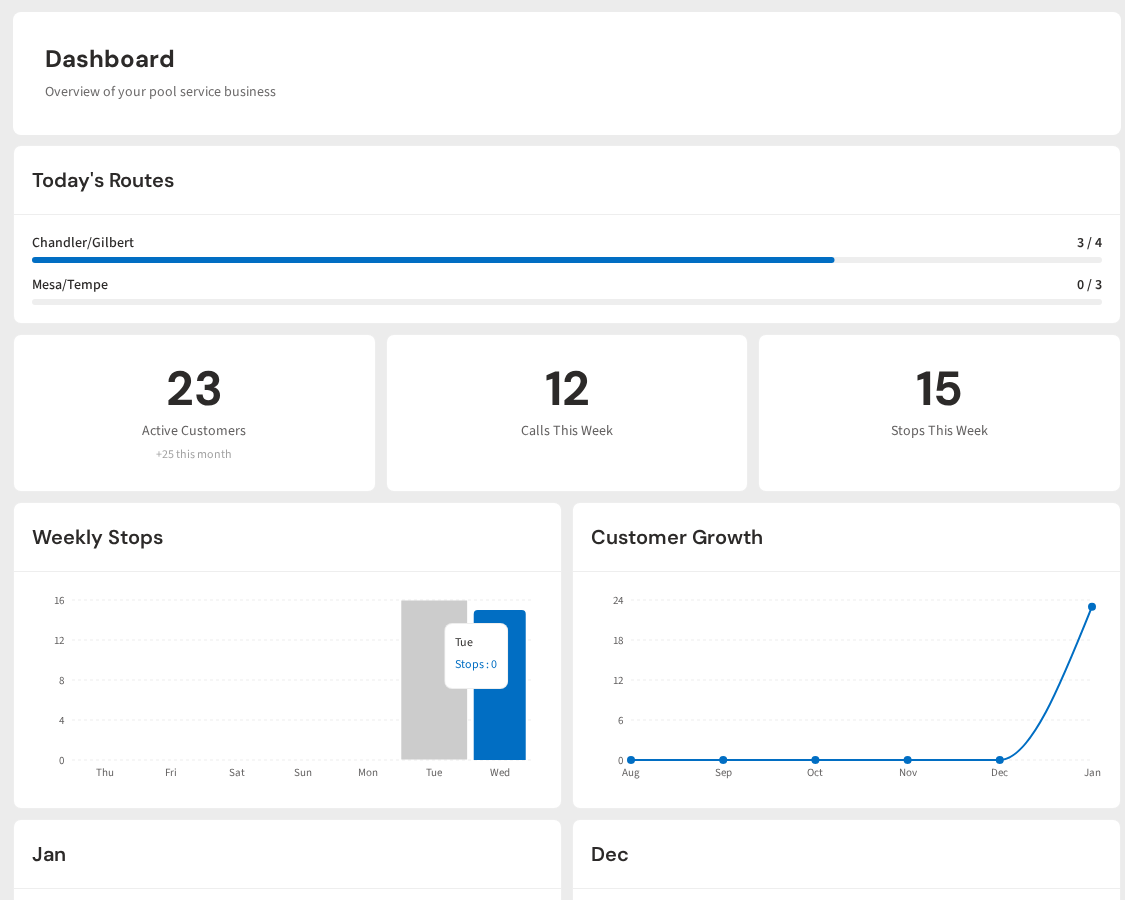
See It in Action: PoolDial Dashboard
PoolDial puts all of these tools in one place. Your billing, routes, messages, and AI assistant all live in a single dashboard. No switching between apps. No copying data from one place to another. Just open PoolDial and everything is there.
Get Your Evenings Back
PoolDial automates invoicing, scheduling, emails, and customer updates. Spend 15 minutes on admin instead of 2 hours. Plans start at $2/pool.
Start Your Free Trial