
The Ideal Mobile Workflow for Pool Technicians


Most pool techs still start their day with a paper route sheet, a separate GPS app, and a group text to the boss. That means flipping between tools at every stop. It slows you down and things fall through the cracks.
There is a better way. With the PoolDial mobile app, your entire workflow lives in one place. Your route, your customer notes, your chemical logs, and your photos. Every step happens on your phone, in order, without switching apps.
This guide walks through the ideal workflow for a pool tech at each stop. We will cover every step from pulling up your route in the morning to marking your last stop complete.
Key Takeaways
- One app for every step. Route, navigation, notes, chemicals, photos, and completion all happen inside PoolDial.
- No more paper route sheets. Your stops show up in order each morning with customer details attached.
- Chemical readings are saved forever. Every reading gets a time stamp and ties to the right pool automatically.
- Photos prove your work. Snap a picture before and after. PoolDial stores it with the service record.
- Your boss sees progress live. GPS tracking and stop completion updates show up in real time.
Step 1: Pull Up Today's Route in PoolDial
Your day starts in the truck. Open the PoolDial app and tap your route. All of today's stops show up in a list, already in order. You can see the customer name, address, and how many stops you have left.
The old way? Print a route sheet at home. Or write it on a clipboard. If a stop gets added or moved during the day, you find out by text. With PoolDial's route feature, changes show up on your phone right away. No reprinting. No confusion.
If you run your own route, you can drag stops to change the order. PoolDial saves the new order so you do not have to redo it tomorrow.
Step 2: Navigate to Each Stop with PoolDial
Tap the first stop on your route. Then tap the navigate button. PoolDial opens turn-by-turn directions to the address. You do not need to copy and paste anything into a separate GPS app.
This saves time at every stop. Instead of typing an address into Google Maps, you tap one button. Over 20 or 30 stops, those saved seconds add up to real time. PoolDial's GPS tracking also lets your office know where you are without you having to check in.
The old way was using a separate GPS app and texting your boss when you arrived. Now it all happens in the background.
Step 3: Check Customer Notes in PoolDial
You pull up to the house. Before you walk through the gate, check the customer notes in PoolDial. Gate code, dog warning, special instructions, notes from the last visit. It is all there.
This matters most when you are covering a route that is not yours. You do not know this customer. You do not know their pool. But PoolDial does. The notes tell you everything you need so you can service the pool the right way.
Customer notes in PoolDial are your written process. Every tech sees the same info. Nobody has to wing it.
Step 4: Service the Pool and Run PoolDial Inspections
Now you do the work. Skim, brush, vacuum, empty baskets, check the equipment. This is the part you already know how to do.
What makes PoolDial different is the inspection checklist. Your company can set up a list of tasks for each visit. As you finish each one, check it off in the app. This keeps the service consistent across your whole team.
When every tech follows the same checklist, pools stay cleaner and customers stay happier. The checklist also creates a record that proves the work was done.
Step 5: Log Chemical Readings in PoolDial
After you test the water, open PoolDial and tap the chemical log. Enter your readings for free chlorine, pH, alkalinity, CYA, or whatever you test. PoolDial saves the reading with a date and time stamp, tied to the right pool.
PoolDial's chemical tracking lets you scroll back through past readings. If chlorine has been dropping for weeks, you can spot the trend and fix it before the pool turns green.
The old way was writing readings on a clipboard or not recording them at all. That means no history and no way to catch problems early. For a full walkthrough, read our guide on how to log pool chemical readings.
Step 6: Take Photos and Mark Complete in PoolDial
Before you leave, snap a photo of the pool. PoolDial lets you attach photos to the service record. This is useful when a pool has a problem, when you want to show the customer what you found, or when you just want proof that the pool looked good when you left.
Then tap "Mark Complete." PoolDial logs the time, updates your route progress, and moves you to the next stop. Your boss can see in real time that you finished. No text needed. No phone call.
After marking complete, tap the navigate button on your next stop. PoolDial takes you there. The cycle starts again.
PoolDial puts all of these systems on your phone. SOPs become checklists. Route optimization becomes tap and drag. Field delegation becomes assigning stops. It all lives in one app.
Old Way vs. the PoolDial Mobile Workflow
Here is a side-by-side look at how the old way compares to using PoolDial at each step of your day.
| Step | Old Way | With PoolDial |
|---|---|---|
| Pull up route | Paper sheet or clipboard | Tap the app, see all stops in order |
| Navigate | Type address into GPS app | One-tap navigation from route |
| Customer notes | Call the boss or guess | Notes, gate codes, and history on screen |
| Service checklist | Memory or paper list | Digital checklist in the app |
| Log chemicals | Write on clipboard or skip it | Tap, type, saved with history |
| Take photos | Phone camera, lost in camera roll | Attached to service record |
| Mark complete | Text the boss | One tap, boss sees it live |
| Next stop | Check the paper, type new address | Tap next, navigate, go |
Every step is faster with PoolDial. And every step creates a record. That means better service, happier customers, and less time wasted switching between tools. For more on running your business from your phone, read our guide on managing your pool business from your phone.
See It in Action: PoolDial Routes on Mobile
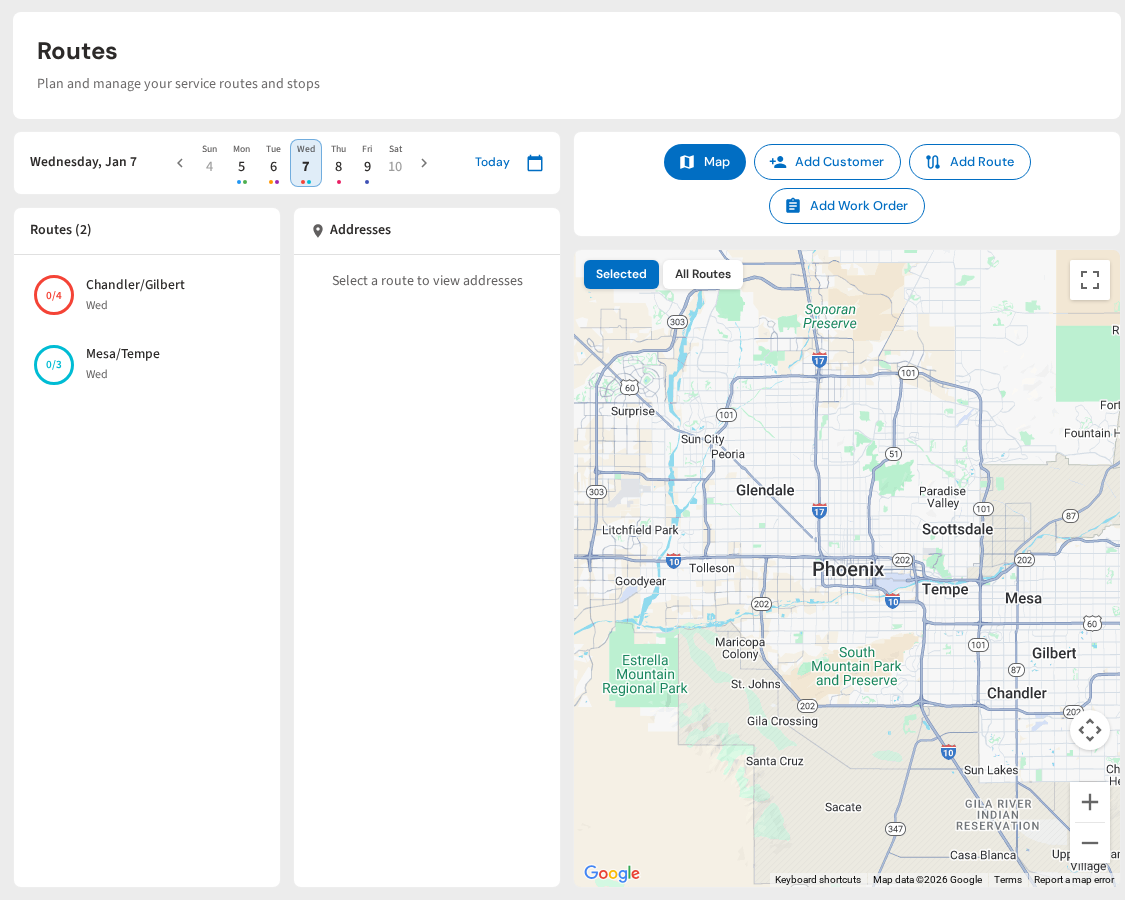
Here is what a tech's route looks like inside the PoolDial mobile app. Every stop, every detail, one screen.
Give Your Techs a Better Workflow
PoolDial's mobile app handles routes, navigation, chemical logs, photos, and inspections. All in one place. Available on iOS and Android. Plans start at $2/pool.
Start Your Free Trial