
How to Reduce Drive Time Between Pool Stops


Drive time is money you never get back. Every minute you spend in the truck is a minute you're not cleaning a pool. You're still paying for gas, wear on your truck, and your own time. But you're earning nothing.
The good news: drive time is one of the easiest things to fix. You don't need to raise prices or add new customers. You just need to tighten what you already have.
Key Takeaways
- Drive time is your biggest hidden cost. 30 minutes of windshield time costs about $14 in lost labor alone.
- Cluster your pools by area. Each day should cover one tight zone, not scatter across town.
- Cut the outliers. A pool 20 minutes from your cluster costs more to service than it earns.
- Review your routes twice a year. Pools get added and dropped. Your route drifts out of shape over time.
- Use a map, not a list. You can't spot wasted drive time on a spreadsheet. You need to see your stops on a map.
The Real Cost of Drive Time
Most pool pros know drive time wastes money. But few sit down and do the math. When you add it up, the numbers are hard to ignore.
Think about that. Over $13,000 a year just from loose routes. That's not a new truck payment. That's not a marketing budget. It's money that disappears into your windshield every single day.
And it gets worse. Drive time also means more gas, more oil changes, more tire wear, and more miles on a truck you'll need to replace sooner. Use our cost per pool calculator to see how drive time affects your per-stop profit. PoolDial's analytics track your drive time per route so you can put a real number on the waste.
Why Drive Time Sneaks Up on You
Nobody plans a bad route. It happens over time. You pick up a new customer across town because they called first. You keep a pool that's 15 minutes from everything else because the customer is nice. You add a stop on Tuesday even though all your other Tuesday pools are on the other side of the city.
That's why it's so dangerous. You don't get an invoice for drive time. It doesn't show up on a bill. It just quietly eats your profit every week. PoolDial's GPS tracking logs actual drive patterns so the waste becomes visible.
Step 1: Map Your Current Route
Before you fix anything, you need to see the problem. Pull up every stop on a map. Not a list. A map.
When you see your stops laid out, the problems jump off the screen. You'll spot the pool that's 20 minutes from everything else. You'll see the zigzag pattern where you cross your own path. You'll notice that three Tuesday pools are right next to five Wednesday pools.
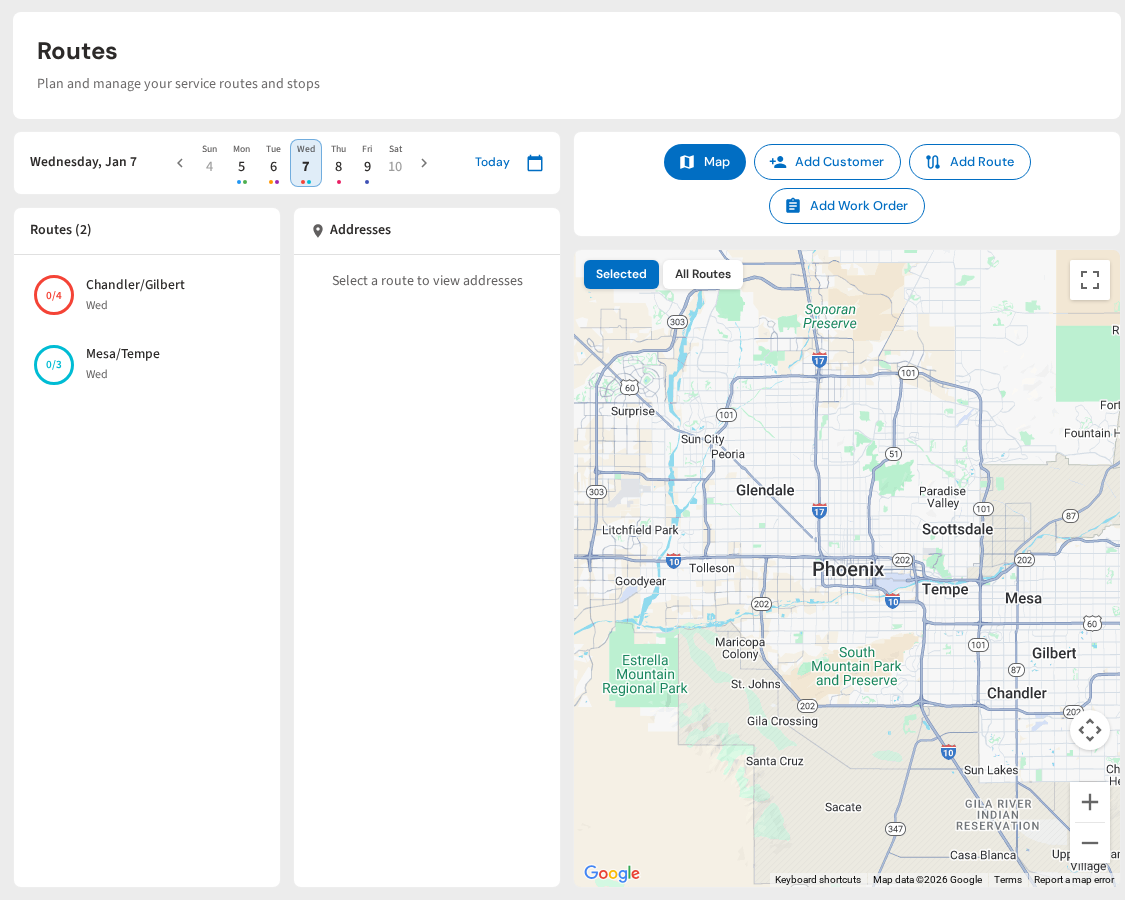
PoolDial's route planner puts every stop on a map with color-coded days. You can see your entire week at once. That alone shows you where the waste is.
Step 2: Cluster Your Pools by Area
The single best thing you can do for drive time is group pools by neighborhood. Each day should cover one tight area. Not two areas on opposite sides of town. One area.
Here's a simple test: look at your route for any day this week. If you're driving past pools you service on a different day, your route needs work. Those pools should be on the same day. PoolDial's map view shows all your days at once so overlap jumps right out.
Step 3: Cut the Outliers
Every route has one or two pools that don't belong. They're the stops that are far from everything else. Maybe the customer pays well. Maybe they were one of your first. But the drive time to reach them costs more than the service is worth.
Do the math on each outlier. If it takes you 20 extra minutes round trip to service a pool that pays $150 a month, you're spending about $10 in labor and $3 in gas every visit just on the drive. That's $52 a month in drive cost alone. On a four-visit month, that pool only nets you about $98 instead of $150.
You have three options for outliers:
- Move them to a day when you're already nearby. Sometimes an outlier on Tuesday is right next to your Thursday cluster.
- Raise the price. If the customer is far from your zone, charge for the extra drive time. Many will accept a small increase.
- Let them go. Replace one far-away pool with two close ones and come out ahead.
PoolDial highlights outlier stops on the map so you can spot the ones costing you the most.
Step 4: Fix Your Stop Order
Even with pools in the right area, the order you visit them matters. A bad stop order has you zigzagging back and forth across the same neighborhood.
The best route makes a loop. Start at one end, work through the cluster, and end near home or your next zone. Never cross your own path. If you're driving past a pool you already serviced, your order is wrong.
Two tricks that help:
- Start with the farthest pool. Drive out while traffic is light, then work your way back toward home.
- Avoid left turns on busy roads. UPS saves millions a year by favoring right turns. It sounds silly, but it works. Right turns don't have you sitting at intersections.
PoolDial's route optimizer can reorder your daily stops with one tap to find the fastest loop.
For a deeper look at daily stop planning, check out our guide on pool route scheduling.
Step 5: Check Your Routes Every Six Months
Routes drift. You add three pools here, lose two there. Six months later, your nice tight route has gaps and outliers again.
Set a reminder to review your routes in March (before the busy season) and September (as things slow down). Pull up the map, look for outliers, check your drive times, and rearrange what needs fixing. It takes an hour twice a year and saves thousands. PoolDial keeps all your route history, so you can compare this month's drive times to last quarter's.
What Good Drive Time Looks Like
How do you know if your route is tight enough? Here are some benchmarks:
| Metric | Loose Route | Tight Route |
|---|---|---|
| Avg. drive between stops | 12-15 minutes | 3-7 minutes |
| Total drive time per day | 3+ hours | 1-1.5 hours |
| Pools per day (solo) | 12-15 | 18-25 |
| Gas cost per week | $200+ | $80-120 |
If your numbers look more like the "loose" column, you have room to improve. Even small changes add up fast. Cutting two minutes per stop on a 20-pool day saves 40 minutes. That's almost another pool you could fit in. PoolDial shows your average drive time between stops so you can track where you stand.
See It in Action: PoolDial Route Planner
PoolDial shows all your stops on a map. You can see drive times between each stop. Drag and drop to reorder. Move pools between days. The total time updates as you go. No more guessing whether your route is tight enough.
See Where Your Route Is Leaking Profit
Map your stops, spot the outliers, and tighten your drive time. PoolDial's route planner makes it easy. Plans start at $2/pool.
Start Your Free Trial