
How to Automate Call Booking for Pool Service Requests


A homeowner calls about a broken pump. You answer while driving between stops. You grab a pen and scribble on a napkin. Later, you type it into a spreadsheet. Then you call the customer back to confirm the address. It works, but it wastes time and things slip through the cracks.
There is a better way. PoolDial's AI receptionist answers the call, collects every detail, and books the job for you. No napkins. No callbacks. No lost leads.
Key Takeaways
- Manual call booking is slow. Writing notes by hand and entering them later wastes hours every week.
- Details get lost. Names get misspelled. Phone numbers get transposed. Addresses get left out.
- PoolDial automates the whole process. The AI receptionist answers, collects info, creates the customer record, and builds the work order.
- Techs see new jobs right away. Every booked job shows up on the tech's route in the PoolDial mobile app.
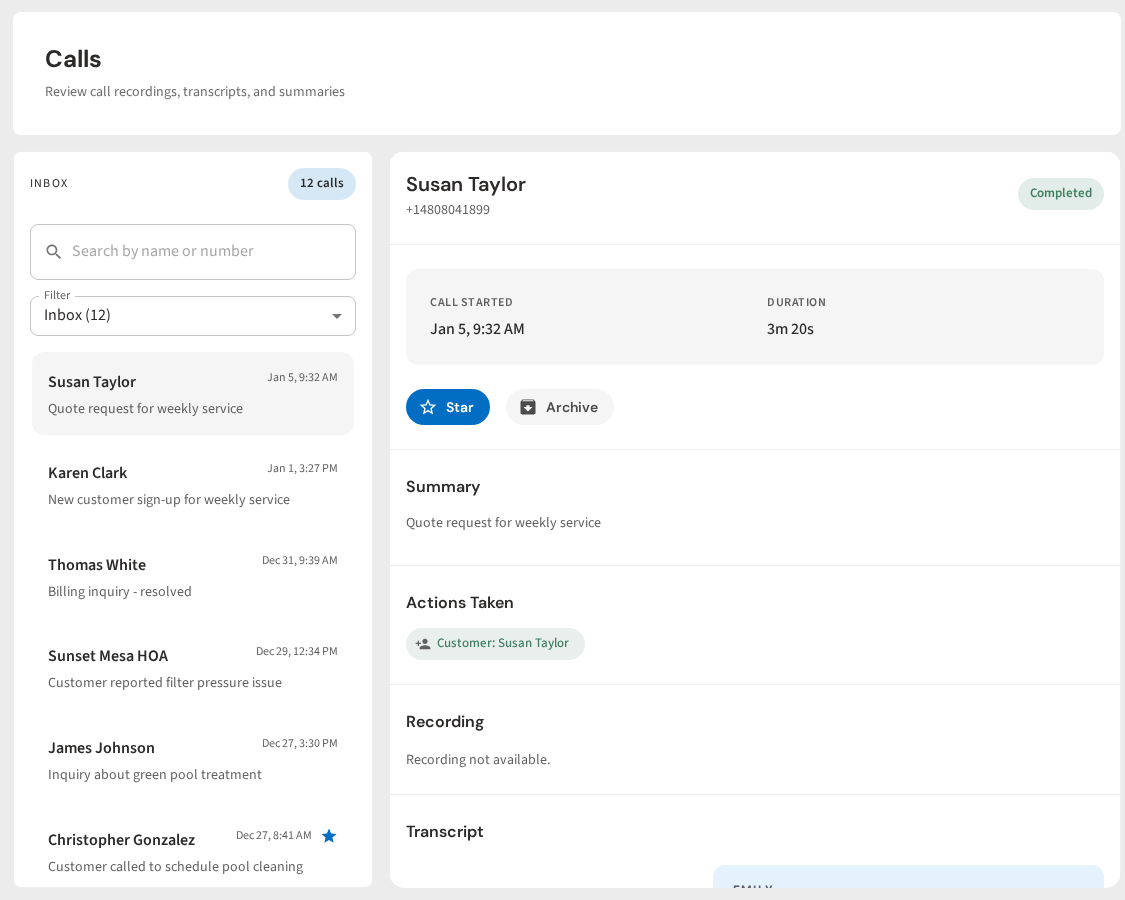
- Every call is logged. Full transcripts are saved in conversations so nothing falls through the cracks.
The Old Way of Booking Pool Service Calls
Most pool companies still book jobs the same way they did 20 years ago. A call comes in. Someone answers (if they can). They write down the caller's name, phone number, address, and what they need. Then they hang up and move on to the next task.
Later that night, they sit down and type everything into a spreadsheet or software. Sometimes the handwriting is hard to read. Sometimes the note is missing the address. Sometimes the sticky note fell off the dashboard and is gone.
Then comes the callback. You have to call the customer back to confirm the details. Maybe they do not answer. Now you are playing phone tag. The job that should have taken two minutes to book just ate 30 minutes of your day.
PoolDial removes every one of these steps. The AI handles the call, captures the details, and puts the job on your schedule. You just show up and do the work.
What Info PoolDial Captures on Every Call
A booked job is only as good as the info behind it. Miss the address and your tech drives to the wrong house. Miss the phone number and you cannot send a confirmation. PoolDial's AI receptionist collects every piece of info you need, every time.
Here is what gets captured on each call:
- Caller's full name. First and last, spelled correctly. The AI confirms the spelling during the call.
- Phone number. Pulled from caller ID and verified during the conversation.
- Service address. The AI asks for the property address where the work will happen. This matters when the caller owns more than one property.
- What they need. Is it a one-time cleanup? A repair? Weekly service? The AI asks the right questions to find out.
- Urgency level. The AI notes if the caller says things like "the pool is green" or "my pump stopped working." This helps you prioritize.
- How they found you. The AI can ask how they heard about your company. This helps you track which marketing is working.
All of this info goes straight into PoolDial. No typing. No guessing. No gaps. It shows up in the customers tab and is ready for you to review.
How PoolDial's Automated Booking Works
When someone calls your PoolDial number, the AI receptionist picks up right away. Here is what happens step by step:
- The AI answers with your company name. The caller hears a friendly voice that sounds professional. It greets them and asks how it can help.
- It has a real conversation. The AI does not read a script. It listens, asks follow-up questions, and responds naturally. If the caller says "my pool is turning green," the AI knows to ask about the pool size and how long it has been that way.
- It collects the booking details. Name, phone, address, service type. The AI gathers everything in a natural flow. No awkward pauses or robotic prompts.
- It creates the customer record. If the caller is new, PoolDial creates a new customer profile with all their info. If they are already in your system, it matches them to their existing record.
- It creates the work order. PoolDial builds a work order with the service details and attaches it to the customer. The job is now on your schedule.
- It sends you a summary. You get a text with the key details. The full transcript is saved in conversations.
The whole call takes two to three minutes. By the time the caller hangs up, the job is booked and waiting for you.
What Happens After the Call in PoolDial
The call ends, but the automation keeps going. PoolDial does not just record the info. It puts it to work.
First, you get a text message with a summary of the call. It tells you who called, what they need, and where they are. You can glance at it in 10 seconds and know if it needs your attention right now.
Second, the full transcript is saved in PoolDial's conversations tab. You can read exactly what was said. This is helpful if you need to double-check a detail before showing up to the job.
Third, the customer record is created or updated. Their name, phone, address, and service notes are all there. When you arrive at the job, you can pull up their profile and see everything.
Fourth, the work order is ready to go. It has the service type, the customer's notes, and the address. You can assign it to a tech, add it to a route, or schedule it for a specific day.
Nothing sits on a napkin. Nothing waits to be typed in. PoolDial handles it all the moment the call ends.
How Techs See New Jobs on Their Route with PoolDial
Your techs do not need to call the office to find out about new jobs. When PoolDial's AI books a job and you assign it, the job shows up on the tech's route in the mobile app. They open the app in the morning and see the new stop right there on their list.
Each job card shows the customer name, address, and what needs to be done. The tech can tap for more details, including any notes from the call. They can also pull up directions with one tap.
This means no more phone calls between the office and the field. No more texting addresses back and forth. No more confusion about what the customer actually asked for. PoolDial keeps everyone on the same page.
PoolDial gives you that written process. Every new client goes through the same flow. The AI collects the same info every time. The work order is built the same way every time. Your techs always know what to expect.
Why Manual Booking Costs You Money (and How PoolDial Helps)
Manual call booking does not just waste time. It costs you real money. Here is how:
- Missed calls become missed revenue. If you are on a roof cleaning a filter and cannot answer, that caller moves on. PoolDial's AI picks up every call, so you never lose a lead. Learn more about what those missed calls really cost in our guide on the cost of missed pool service calls.
- Bad data leads to wasted trips. A wrong address means your tech drives to the wrong house. A missing phone number means you cannot confirm the appointment. PoolDial captures clean data every time.
- Slow follow-up loses customers. When you call back six hours later, the customer may have already hired someone else. PoolDial books the job on the spot, so there is no delay.
- Admin time adds up. Typing notes into your system takes 5 to 10 minutes per call. If you get 5 calls a day, that is almost an hour of data entry. PoolDial does it in zero minutes.
For more on what happens when calls go unanswered, read our guide on handling after-hours pool service calls.
Getting Started with Automated Call Booking in PoolDial
Setting up automated call booking in PoolDial takes just a few minutes. Here is what to do:
- Set up your AI receptionist. Go to your PoolDial dashboard and turn on the AI receptionist. Add your company name, services, pricing, and service area. The AI uses this info to have smart conversations with callers.
- Choose when it answers. You can have the AI answer all calls, only after-hours calls, or only calls you miss. Most pool pros start with missed calls and switch to always-on after a few days.
- Let it run. That is it. The next time someone calls, PoolDial answers, books the job, and sends you a summary. Check your conversations tab to review transcripts and your work orders to see new jobs.
No app to download. No hardware to install. No training for your team. PoolDial handles the calls and your techs see the jobs in their app.
See Automated Call Booking in Action
PoolDial's AI receptionist turns every phone call into a booked job. It answers, collects the details, creates the customer record, and builds the work order. Your techs see new jobs on their route. You see call summaries on your phone. Nothing gets lost.
Turn Every Call Into a Booked Job
PoolDial's AI receptionist answers calls, captures details, and creates work orders automatically. No more napkins, callbacks, or lost leads. Plans start at $2/pool.
Start Your Free Trial