
How to Collect Payments Faster as a Pool Service Company


Nobody starts a pool service company because they love billing. You got into this to be outside, work with your hands, and build something. But at some point, usually around 30 or 40 pools, the billing side starts to eat your evenings. You're folding invoices, chasing checks, and texting customers who are three weeks late.
The pool pros who fix this early grow faster than the ones who don't. Here's how to set up a payment system that gets you paid on time without turning you into a collections agent.
Key Takeaways
- Bill in advance, not after the fact. You should have payment before you show up, not 30 days after
- Require a card on file for every customer. No exceptions. This is now industry standard
- Automate everything. Manual invoicing doesn't scale past 50 pools
- Split billing into two cycles. Bill half your customers on the 1st and half on the 15th to smooth cash flow
- Have a clear late payment policy. Put it in writing, enforce it consistently, and suspend service when needed
The Real Cost of Chasing Payments
Late payments aren't just annoying. They're expensive. Every hour you spend following up on unpaid invoices is an hour you're not servicing pools, selling new accounts, or running your business. And the cash flow gap between doing the work and getting paid for it is what kills growing pool companies.
If you're billing after the fact with net-15 or net-30 terms, you could be servicing a pool for 6 weeks before you see a dollar. Multiply that by 100 pools and you're floating tens of thousands of dollars in unpaid labor. Pool service software like PoolDial can automate this entire process, but the strategy matters just as much as the tool.
One pro learned this lesson the hard way. He shocked and flocced a customer's pool, then returned two days later to vacuum. She would not answer the door or the phone. Turns out she saw the water was clear and decided the job was done. No need to pay, no need to call back. She later threw a pool party and found out why vacuuming matters when all the flocced sediment kicked back up. She still left a one-star review.
"Because the water was crystal clear, she thought the job was done and there was no need for me to come back. And so she was just going to stand me up and not pay me."
— Pool pro via Reddit
The lesson: never do work without payment secured first, especially for one-time customers. A card on file or prepayment removes the risk entirely.
Bill in Advance, Not After
The single biggest change you can make is switching from billing after service to billing before service. Send the invoice on the 1st. Charge the card on the 3rd. Service the pool on the 10th. If the payment doesn't go through, you know before you've done the work.
This is a mindset shift for a lot of pool pros. It feels weird to charge someone before you've cleaned their pool. But think about how every other subscription works: Netflix, your gym, your phone bill. They all charge on the 1st. Your customers are already used to this model. With PoolDial's billing system, you can set up automatic invoicing on whatever schedule you choose and cards get charged automatically.
Require a Card on File
Every new customer should have a credit card or ACH account on file before their first service. No exceptions. This used to be a hard sell, but it's become the norm.
The conversation with new customers is simple: "We keep a card on file and bill on the 1st of each month. We accept Visa, Mastercard, or ACH." That's it. Don't present it as optional. Pool companies that waffle on this end up with a mix of payment methods that's impossible to manage. PoolDial stores cards securely through Stripe, so customers can also update their own payment method through the customer portal without calling you.
For existing customers who are still paying by check, transition them in batches. Send a message through broadcast messaging letting them know you're moving to electronic payments. Give them 30 days. Most will comply without pushback.
Set Up Two Billing Cycles
If you bill all your customers on the 1st, you get one big deposit and then nothing for 30 days. That works fine at 30 pools. At 150 pools with employees, a single billing cycle creates cash flow gaps that make it hard to cover payroll mid-month.
The fix: split your customer base into two billing cycles.
Single Cycle (1st of month)
Bill everyone on the 1st. Simple to manage. One billing day per month.
Two Cycles (1st and 15th)
Half your customers bill on the 1st, half on the 15th. Money comes in twice a month.
In PoolDial, you can assign customers to different billing schedules and the system handles the rest. Invoices go out, cards get charged, and you get a report of who paid and whose card declined.
Automate or Drown
Manual billing stops working somewhere between 40 and 60 pools. Before that, you can get away with QuickBooks invoices or even handwritten statements. After that, you're spending entire evenings on billing instead of sleeping.
What "automate" means in practice:
- Invoices generate automatically on the 1st (or 15th) based on each customer's service plan
- Cards charge automatically 2-3 days after the invoice is sent
- Failed payments trigger a notification so you can follow up before the next service visit
- Receipts send automatically so customers aren't calling to ask if they paid
This is exactly what PoolDial's billing is built for. Set it up once, and monthly billing runs itself. You only get involved when something goes wrong, like a declined card or a disputed charge.
Handle Late Payers Without Losing Them
Even with autopay and cards on file, you'll have late payers. Cards expire. Banks flag charges. Customers cancel cards and forget to update them. The key is having a clear process that handles this without you personally texting each person.
A good late payment process looks like this:
- Day 1: Card declines. System sends automatic notification to the customer asking them to update their payment method
- Day 3: Still unpaid. Second automatic reminder. PoolDial's customer portal lets them update their card themselves without calling you
- Day 7: Still unpaid. You or your office sends a personal text through PoolDial's inbox: "Hey, looks like your card didn't go through. Can you update it so we can keep your service running?"
- Day 14: Still unpaid. Service suspension notice. "We'll need to pause service until the balance is current."
- Day 21: Suspend service. Remove from the route. Don't service unpaid pools
The important thing is consistency. If you suspend one customer at 21 days but let another slide for 60, you'll lose credibility (and money). Put the policy in your service agreement so customers know the rules before they sign up.
One lesson pros learn the hard way: never let balances grow. One pool pro had a customer who paid the monthly service fee every month but "forgot" to pay for extras like filter cleans and small repairs. By year-end, the balance was $700. When the pro sent a summary statement and threatened collections, the customer flipped.
"I've learned from experience not to let clients' balances get too high. Eventually it reaches the 'I'd rather stiff the pool guy' amount and then it's a real battle."
— Pool pro via Reddit
The fix is simple: charge for extras immediately, not at the end of the month. If a tech does a filter clean, it goes on the next invoice or gets charged to the card on file that day. Small balances get paid. Big balances become disputes.
What to Include on Every Invoice
A clear invoice reduces confusion and support calls. Every invoice should include:
- Service period. "Monthly pool service: May 2026"
- Service address. Important for customers with multiple properties
- Line items. Base service fee, any add-ons (filter clean, chemical surcharge, repair parts)
- Payment method on file. "Visa ending in 4242"
- Due date. Not "net 15." A specific date: "Due May 3, 2026"
- Late fee policy. "$15 late fee after 10 days" (check your state's rules on late fee limits)
PoolDial generates invoices automatically with all of this information pulled from the customer record. If a tech logs a filter clean or adds parts during a visit, the charge shows up on the next invoice without you doing anything.
Monthly vs. Per-Visit Billing
Most pool service companies bill monthly, but some charge per visit. Each has trade-offs.
| Monthly Billing | Per-Visit Billing | |
|---|---|---|
| Cash flow | Predictable, one charge per month | Variable, depends on visit count |
| Admin load | One invoice per customer per month | Invoice per visit (4-5x more invoices) |
| Customer preference | Simpler for the customer | Feels "fairer" to some customers |
| Skip weeks | You eat the cost of skipped weeks | Customer only pays when you show up |
| Best for | Year-round service, full-service accounts | Seasonal markets, chemical-only service |
Monthly billing is simpler and better for cash flow. If you're in a year-round market (Florida, Arizona, Texas), monthly is the clear choice. If you're in a seasonal market where pools close for winter, per-visit or seasonal billing may make more sense. PoolDial supports both models, plus seasonal rate adjustments for summer/winter pricing.
Processing Fees: Who Pays?
Credit card processing typically costs 2.9% + $0.30 per transaction. On a $165/month pool service, that's about $5.09 per customer per month. Across 100 customers, that's $509/month in processing fees.
You have three options:
- Absorb it. Build it into your service pricing. Most customers won't notice a $5 price increase
- Pass it through. Add a "convenience fee" line item. Some states restrict this, so check local regulations
- Offer ACH as an alternative. Bank transfers typically cost $0.50-$1.00 per transaction, saving you 75-80% on processing. PoolDial supports ACH payments alongside credit cards
Most pool companies absorb the fee and consider it the cost of getting paid instantly instead of waiting 15-30 days for a check. The math works out: $5 in processing fees is far cheaper than the time you'd spend chasing a late check.
See It in Action: PoolDial Billing
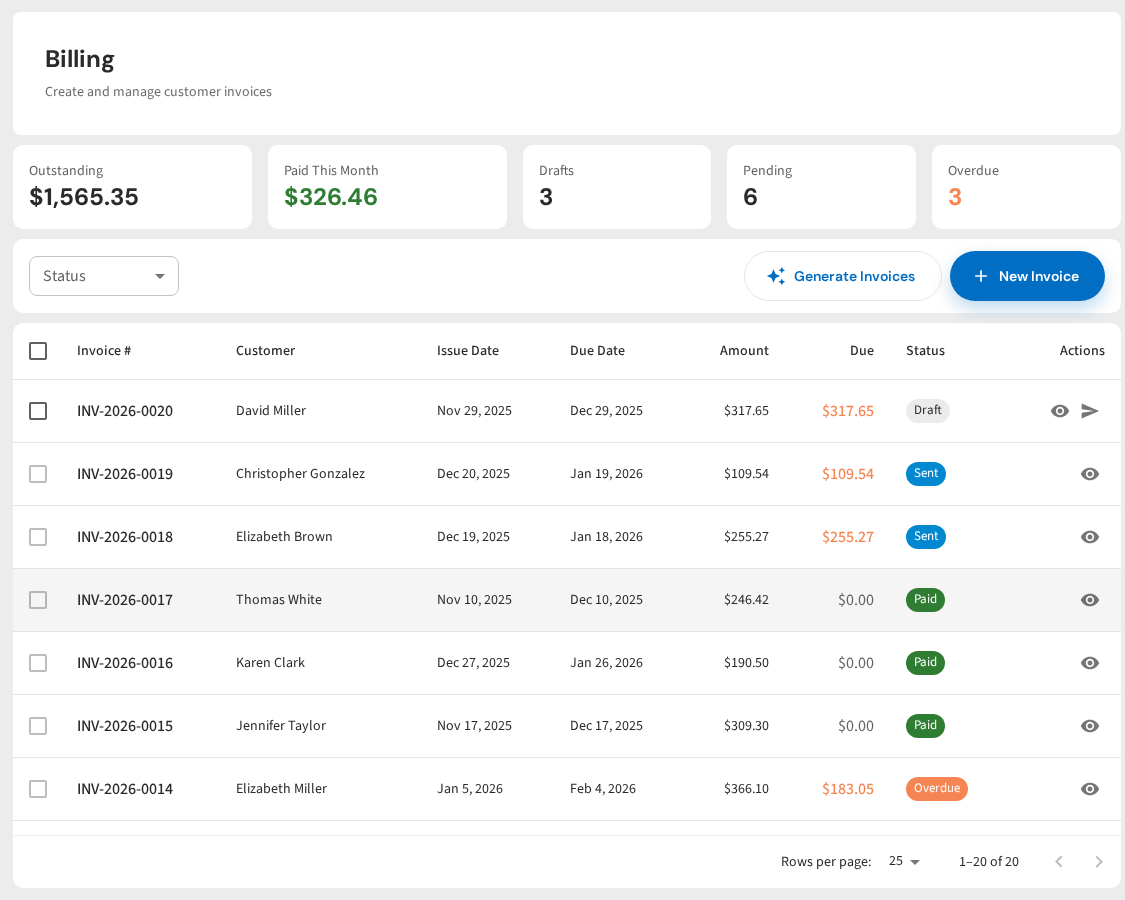
PoolDial's billing system handles automatic invoicing, card-on-file payments, multiple billing cycles, and failed payment notifications. Customers can view invoices and update their payment method through the self-service portal.
Stop chasing checks
Automatic invoicing, card-on-file payments, and a customer portal where clients update their own payment info. All at $2/pool.
Start Your Free Trial